My XP-Pen Artist Pro 13.3 has been a reasonable source of headaches for a long time since swapping over to Guix as a full-time system. I thought this might be the most appropriate place for me to discuss the depths of which I've traveled to the bottom of to arrive at my final solution. Join me for the dumbest journey possibly ever seen.
Bootstrapping XP-Pen
XP-Pen provides a closed source "driver" as we could call it that interacts with the device over USB to change various settings like key mapping or pen pressure range. Using this software proved me no issues on Arch Linux since somebody kindly maintained a xp-pen package on the AUR. But... Well, let's not talk about what's been going on with AUR recently.
Now on Guix, nobody has a package for XP-Pen because it's a closed source binary, and the main derivative of proprietary bullshit Nonguix doesn't have an entry for it either. I've always assumed because nobody has a tablet uses Guix, or because it simply wasn't worth the headaches. I never asked in IRC on the #guix channel frankly, not worth annoying fellow Guixers about it. It's my burden, I'll work out a solution surely.
My first approach is the idea that the XP-Pen driver called PenTablet needs a bunch of packages to be made usable on the system. To prove that it can run, I don't need to make a package, I can simply use a guix shell. The shell command will pull in packages into an isolation chamber of sorts so you can build programs or run things without impacting your main system. Good for testing if a package is going to work on your system or not before installing it. I have a very long Guix shell command in my history that is certainly going to be fun to look at.
guix shell --container -F -u steve --network \
  --share=$XDG_RUNTIME_DIR --share=/dev \
  --share=/dev/input --share=/dev/bus/usb \
  --share=/dev/usb --share=/run --share=/etc/localtime \
  --share=/etc/udev/udev.conf=/etc/udev/udev.conf \
  -- preserve='^WAYLAND_DISPLAY$' --share=/sys \
  --preserve='^XDG_RUNTIME_DIR$' \
  bash coreutils gcc-toolchain glibc icu4c openssl \
  zlib sed grep libevdev libusb libx11 libxtst libxrandr \
  libglvnd glib dbus qtbase@5 qtwayland@5 usbutils less \
  strace libgudev eudev gtk libappindicator libnotify
The meat and potatoes of this command is the --container and -F flag, where -F means --emulate-fhs. Because Guix does not have a typical Linux standard filesystem layout, we are missing things like /usr/lib which is used for linking programs to shared libraries on a system. This will effectively collapse any and all packages along a few paths so shared libraries will be compressed into the /usr/lib folder.
After a lot of trial and error, I am able to boot the PenTablet program... But it's not quite working as expected.
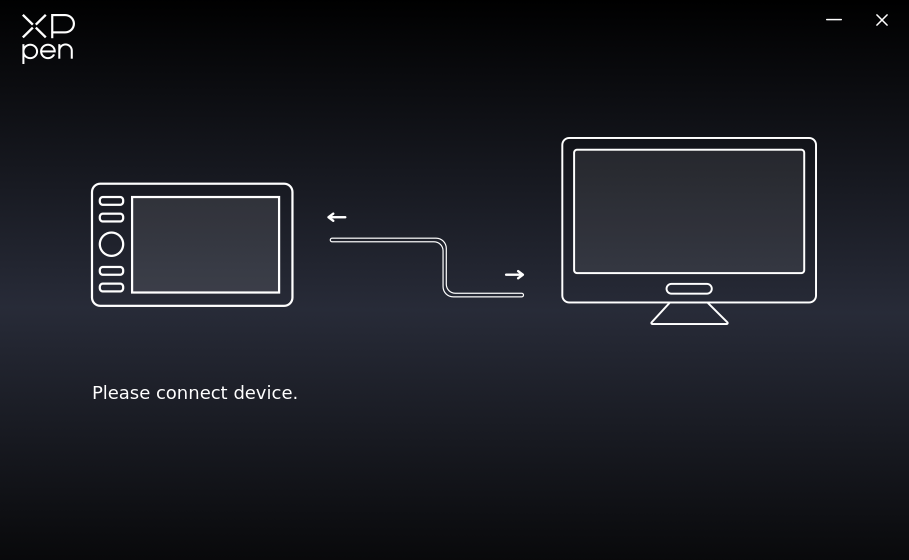
The only problem is that it doesn't pick up my USB device at all. The program is currently screaming about not being able to find a configuration file along the /usr/lib/pentablet path, because Guix does not have a normal FHS path that would make that exist. I can't debug the program any further than that, really.
...Or can I?
Stracing
I don't consider myself an amazing programmer. By any stretch of the imagination, I write in fun languages and don't need to interact with low-level debugging involving Linux syscalls. I rarely get opportunities to debug things or solve problems. This program, however, is just another opportunity to learn something perhaps. This is where strace kicks in.
strace is a tool to trace syscall operations made by a program, so we can listen and inspect what a program is actually doing by observing the syscalls it makes. Maybe we can learn something about what is going wrong. Or, feed it into a large language model (sigh) and see if you can burp up an ideas based on their output.
Heading back into the shell, we can use strace inside a container to observe the syscalls. I will insert my own comments based on what I think is happening. With no access to source code, this is one of the few things I can do. I observed the following series of syscalls and I can only infer what is going on with some comments added.
### Scans through devices iteratively
openat(AT_FDCWD, "/sys/bus/usb/devices/usb5/bConfigurationValue", O_RDONLY|O_CLOEXEC) = 30
openat(AT_FDCWD, "/sys/bus/usb/devices/usb5/bConfigurationValue", O_RDONLY|O_CLOEXEC) = 30

### Finds my tablet as a matching device
openat(AT_FDCWD, "/gnu/store/1sbkaxg5r5ryn3m6jmqbkgsmi7a2zir3-glibc-for-fhs-2.41/lib/gconv/UTF-16.so", O_RDONLY|O_CLOEXEC) = 30
manufacturer:UGTABLET product:13.3 inch PenDisplay Get Max X:0x72b2 Y:0x407e  Press:0x1fff

### Looks for the config.xml file, can't find it (ENOENT)
openat(AT_FDCWD, "/usr/lib/pentablet/conf/xppen/config.xml", O_RDONLY|O_CLOEXEC) = -1 ENOENT (No such file or directory)
Function  LoadConfig Error: open file "/usr/lib/pentablet/conf/xppen/config.xml" failed, error: "No such file or directory"
ReadXml Failed!
------------------load xml failed: P1315Pro8K1W
DeviceListLabel: ""

### It can open up the /dev/uinput USB inputs just fine however
openat(AT_FDCWD, "/dev/uinput", O_WRONLY|O_NONBLOCK) = 29
open uinput ok

openat(AT_FDCWD, "/dev/uinput", O_WRONLY|O_NONBLOCK) = 30
open uinput ok

openat(AT_FDCWD, "/dev/uinput", O_WRONLY|O_NONBLOCK) = 31
open uinput ok

openat(AT_FDCWD, "/dev/uinput", O_WRONLY|O_NONBLOCK) = 32
open uinput absmouse ok

### Opens other USB files
openat(AT_FDCWD, "/dev/bus/usb", O_RDONLY|O_NONBLOCK|O_CLOEXEC|O_DIRECTORY) = 35
openat(AT_FDCWD, "/sys/bus/usb/devices", O_RDONLY|O_NONBLOCK|O_CLOEXEC|O_DIRECTORY) = 35
openat(AT_FDCWD, "/sys/bus/usb/devices/usb5/busnum", O_RDONLY|O_CLOEXEC) = 36
openat(AT_FDCWD, "/sys/bus/usb/devices/usb5/devnum", O_RDONLY|O_CLOEXEC) = 36
openat(AT_FDCWD, "/sys/bus/usb/devices/usb5/speed", O_RDONLY|O_CLOEXEC) = 36
I've looked at other syscall error messages and didn't find much more beyond that. There's polling syscalls, but those didn't really reveal anything helpful to me. I basically turned on every syscall I could think of related to opening file streams and beginning mmap'ing memory to start reading device events, but I couldn't make sense of it. Knowing this works on Arch but not on Guix, one can assume it's simply a Guix problem.
It could also be that because this is a container, it's slightly restricted from things it needs because of cgroups. I eventually started prodding around trying to see how I could maybe lower some "barriers" across cgroup processes to give the program more room to breath, but no luck.
I can go further and try and attempt to debug it with gdb, but because I have no access to source code, I would effectively only be able to debug it via registers. Without source code, I am left to guess what is going on through reverse engineering, but I think that's a rabbit hole I'm not quite ready for.
OpenTabletDriver
A program that I was able to prove that also works is OpenTabletDriver. This is a pretty nice program that works with a wide array of tablets, and for anyone using tablets on Linux (read: not Guix) systems, this would be my recommended option. OpenTabletDriver (OTD) runs a server daemon that clients can connect to and will look for devices on the host system. A client can connect to the server to manipulate the devices as needed, so you can change settings with basic scripts or using a GUI that they also provide.
As luck would have it, Guix does not have a package for OTD. Upon further inspection, OTD is written in C#/.NET, meaning it has strong ties to Microsoft-based tooling, and I already knew where this was going. C# is a pretty big problem for Guix because for Linux users to write C# or F#, they need to go through Mono. Mono has not one, not two, but eleven different software licenses. Mono does exist in packages, but it won't go very because most use-cases for Mono may typically involve the .NET SDK. And boy does that SDK have a nice looking software license.
But let me not start shitting all over Microsoft's stuff just yet. I happen to really like F# as a language. C# I really don't like because it's so many terrible Java/C++ ideas shoved into such a mundane and uninteresting language, and generally it doesn't offer any added advantages over a language like Golang, a language that has far less features but a much larger developer pool. Half lucky for us, a dotnet package exists in Nonguix. The bad news, we can't use it. It's too old and OTD requires a specific version for .NET. So... What now.
I went with two routes, and both lead to dead ends:
- Compile the OTD source code by combining a manually downloaded .NET SDK with the
monopackage - Run the OTD pre-built binaries in a Guix shell like the other driver
I can confirm that both do work; the only problem is they also do not find my USB device. I have to only assume that due to the non-FHS environment, these drivers just don't work correctly. Despite that fact, there is even a Nix package for OTD. I've looked it up and down and I can't find the reason why my tablet simply won't get picked up.
I've looked in OTD's source code for days understanding how it works, and it relies on .NET libraries and shared object linked code, which lead me to believe that the problem lies in me simply not packaging my code and treating things as real Guix packages. If OpenTabletDriver were written in a language such as Rust, then it would be quite portable and could easily drop the .NET dependency. Oh well.
Only thing left I can think of: actually trying to create a Guix package myself.
Packaging XP-Pen
Instead of trying to go through the hell of updating the dotnet package which I couldn't get to work, I figured it was easier to simply work with the XP-Pen driver as a baseline. I know it worked, so if I could find the links then it wouldn't be a problem. By running ldd on PenTablet we can see that it is missing a lot of things.
$ ldd xppen/App/usr/lib/pentablet/PenTablet
steve@stovetop ~$ ldd XPPEN1/App/usr/lib/pentablet/PenTablet
    linux-vdso.so.1 (0x00007fca9eee4000)
    libusb-1.0.so.0 => not found
    libX11.so.6 => not found
    libXtst.so.6 => not found
    libXrandr.so.2 => not found
    libQt5Widgets.so.5 => not found
    libQt5Gui.so.5 => not found
    libQt5Xml.so.5 => not found
    libQt5DBus.so.5 => not found
    libQt5Network.so.5 => not found
    libQt5Core.so.5 => not found
    libGL.so.1 => not found
    libpthread.so.0 => /gnu/store/m31vlvwm79m89fk3xk0z4h7snk61y510-glibc-2.41/lib/libpthread.so.0 (0x00007fca9eed3000)
    libstdc++.so.6 => not found
    libm.so.6 => /gnu/store/m31vlvwm79m89fk3xk0z4h7snk61y510-glibc-2.41/lib/libm.so.6 (0x00007fca9ede5000)
    libgcc_s.so.1 => not found
    libc.so.6 => /gnu/store/m31vlvwm79m89fk3xk0z4h7snk61y510-glibc-2.41/lib/libc.so.6 (0x00007fca9ebf5000)
    /gnu/store/m31vlvwm79m89fk3xk0z4h7snk61y510-glibc-2.41/lib/ld-linux-x86-64.so.2 (0x00007fca9eee6000)
Remember from the guix shell --container -F command that we can collapse a bunch of libraries along a /usr/lib path so the program can dynamically load shared objects easily. For us to create a package so this becomes a trivial guix install xppen command, we need a definition that would effectively link all the missing shared objects in the package definition. First let's try and at least get the driver tarball into the Guix store.
(define verno "4.0.15")
(package
  (name "xppen")
  (version verno)
  (source
    (origin
      (method url-fetch/tarbomb)
      (uri
        (string-append
          "https://download01.xp-pen.com/file/2026/04/XPPenLinux"
          verno
          "-260422.tar.gz"))
      (sha256
        (base32
          "19czwmbgqqvlna7k554dvbnl2kk87y724d736aakk7zajvx759r5"))))
  (build-system copy-build-system)
  (native-inputs (list patchelf))
  (inputs
    (list bash coreutils gcc-toolchain glibc icu4c
          openssl zlib libevdev libusb libx11 libxtst
          libxrandr libglvnd glib dbus qtbase-5 qtwayland-5
          usbutils libgudev libappindicator libnotify
          ))
  (home-page "https://www.xp-pen.com/")
  (supported-systems '("x86_64-linux"))
  (synopsis "XP-Pen Driver for the XP-Pen Artist Pro 13.3")
  (description "XP-Pen Driver for the XP-Pen Artist Pro 13.3")
  (license license:expat))
Guix packages work by defining a build-system, and in this case we simply need to copy the contents of the tarball into the Guix store, so we leverage copy-build-system to do exactly that. There's no compilation here whatsoever, but what Guix will do is refer to the inputs as packages it needs to download in order to make this package function. If those packages cannot be built or found, then this package simply cannot work and it will fail.
Another point of how Guix works, since it uses a Git-based process, all these variables refer to the most recent and up-to-date Guix packages available. There may be times where library incompatibilities could happen, and you would need to create package inferiors in order to refer to older packages, but luckily that doesn't seem to be an issue as far as I can see.
After the build, it will appear in a path like /gnu/store/y8w90icad574jan25v0v89vf3xsf2ksr-xppen-4.0.15. But, it's not in a usable state in the slightest. The binary itself since it was not compiled by us has no idea where these shared objects are still. We now need to use a tool called patchelf to alter the binary's ELF references to shared objects.
Now the reason it took me so long to make this post and talk about this is probably due to the patchelf aspect of this all alone. However, I was able to work through the complications of this process and figure out each component. And frankly, having Guix packages written in Guile Scheme makes this much nicer with the added benefit of having a Scheme language being very flexible.
Here we need to create a custom Guix phase. A phase works in that a build system executes a couple of steps to build a program, and sometimes we need to create our own phase to do a little extra work to make a program run. We will need a new phase to link the libraries correctly.
(arguments
  (list
    #:install-plan ''(("XPPenLinux4.0.15-260422" "."))
    #:phases
    #~(modify-phases %standard-phases
      (add-after 'install 'patch-binary
        (lambda* (#:key inputs outputs #:allow-other-keys)
          (let* ((patchelf (assoc-ref inputs "patchelf"))
                  (xppen (assoc-ref outputs "out"))
                  (ld-so (string-append (assoc-ref inputs "glibc")
                                          "/lib/ld-linux-x86-64.so.2"))
                  (pentab (string-append xppen "/App/usr/lib/pentablet/PenTablet")))

          ;; find packages /gnu/store directories based on the inputs
          (define pkg-dirs
            (filter
              (lambda (path)
                (and (file-exists? path)
                     (file-is-directory? path)))
                (map
                  (lambda (pkg)
                    (string-append (assoc-ref inputs pkg) "/lib"))
                inputs)))

          (define rpath (string-join pkg-dirs ":"))
          (invoke "patchelf"
                  "--set-interpreter" ld-so
                  "--set-rpath" rpath
                  pentab)))))))
If that looks long, it's because it is mildly exhausting. What's happening here is that we are binding a new phase to the build system through a lambda* function that is accepting two major variables: the inputs we defined from the inputs field, and a outputs that defines where the package is going (in our case it's a package named xppen).
The easiest way to go about this is taking the entirety of the inputs list and converting each package to a path that resembles /gnu/store/<pkg>/lib. We need to apply an additional filter to assert that the string we made even exists, so we don't bother with inputs that don't provide a shared library. Then, combine all these paths into a big colon-separated string that we can feed into patchelf.
Much to anyone's shock, this still doesn't link everything correctly.
Shared Object Maths
The ldd output now shows a bunch of linked libraries, but also a bunch of libraries still missing. Specifically, zlib is missing at least three times. What the heck is happening and why?
ldd /gnu/store/n0h3nwlgaq5v0y5w09scgwqnd5f3ys8d-xppen-4.0.15/App/usr/lib/pentablet/PenTablet
    ... (redacting text for brevity) ...
    libgobject-2.0.so.0 => not found
    libgthread-2.0.so.0 => not found
    libglib-2.0.so.0 => not found
    libz.so.1 => not found
    libdbus-1.so.3 => not found
    libz.so.1 => not found
    libz.so.1 => not found
    libgthread-2.0.so.0 => not found
    libglib-2.0.so.0 => not found
Now I know that I correctly supplied the libz.so.1 because I personally verified it's existence myself. What's exactly going on here and why? Well, let me revisit something I left out previously.
The PenTablet program includes its own shared libraries meant to be installed on the system. Namely, XP-Pen provides shared libraries mostly because of Qt5. But it's not hard to get Qt5 on most major Linux systems. Why did they include these files?
$ ls XPPEN/App/usr/lib/pentablet/lib
libicudata.so.56    libQt5Core.so.5  libQt5Network.so.5
libQt5XcbQpa.so.5   libicui18n.so.56 libQt5DBus.so.5
libQt5Widgets.so.5  libQt5Xml.so.5   libicuuc.so.56
libQt5Gui.so.5      libQt5X11Extras.so.5
I have to assume only one thing: XP-Pen made modifications to the Qt5 source code and compiled these shared objects to be distributed with the binary. The most important one to assume is the libQt5DBus.so.5 library because that allows Qt to interface with DBus.
My previous iteration of the package layout does take these into account and can easily add them to the main library injection. What doesn't happen is that these libraries do not know where their dependencies are either.
The best way I can describe it is with a little bit of a drawing.
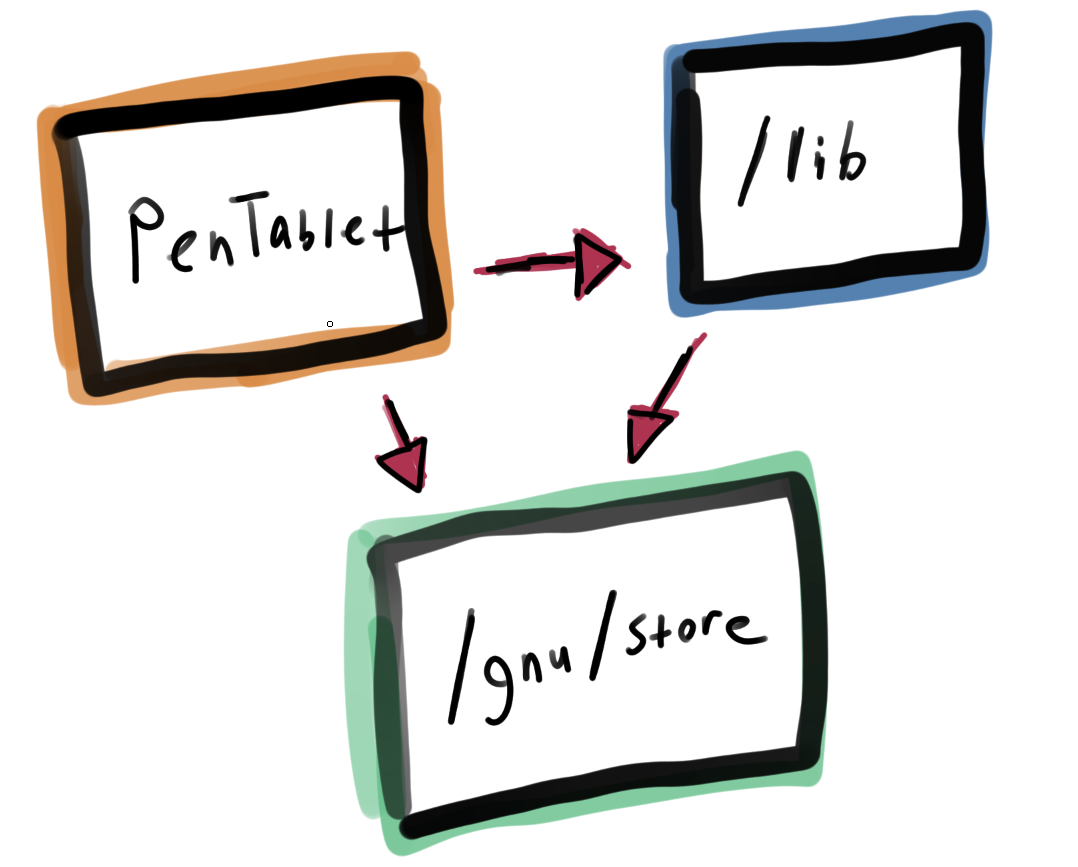
PenTablet needs libraries on the host system as well as libraries inside of the included /lib folder. But /lib also needs libraries on the host system. The way we configured it as is, we never configure the /lib libraries to be contextually aware of the Guix package store, so what we end up with is a gigantic cross-mix of shared object references. The ELF links get flattened when all these links are cross-referenced, so that's why some libraries show up as not found even though we patched in all the library paths correctly.
To rectify this, we need to include the package's shared libraries into the mix as well. Patching each shared object is simpler, all we need to do is make it aware of the Guix store paths, a string we had already made earlier.
(arguments
  (list
    #:install-plan ''(("XPPenLinux4.0.15-260422" "."))
    #:phases
    #~(modify-phases %standard-phases
        (add-after 'install 'patch-binary
          (lambda*
           (#:key inputs outputs #:allow-other-keys)
           (let* ((patchelf (assoc-ref inputs "patchelf"))
                  (xppen (assoc-ref outputs "out"))
                  (ld-so (string-append (assoc-ref inputs "glibc")
                                        "/lib/ld-linux-x86-64.so.2"))
                  (pentab (string-append xppen "/App/usr/lib/pentablet/PenTablet"))
                  (libs (string-append xppen "/App/usr/lib/pentablet/lib")))

             (define pkg-dirs
               (cons libs
                 (filter
                   (lambda (path)
                     (and (file-exists? path)
                          (file-is-directory? path)))
                     (map
                       (lambda (pkg)
                         (string-append (assoc-ref inputs pkg) "/lib"))
                     inputs)))

             (define rpath (string-join pkg-dirs ":"))

             (for-each (lambda (f)
                         (display (format #f "patching ~a ... \n" f))
                         (invoke "patchelf" "--set-rpath" rpath f))
                       (append (find-files libs "\\.so.*")))

             (invoke "patchelf"
                     "--set-interpreter" ld-so
                     "--set-rpath" rpath
                     pentab))))))))
After all that exhaustive time, the ldd output finally shows all the libraries are now linked correctly.
ldd /gnu/store/8nx5cm5cb1fwm3rp9cpv2psi62pb4c8q-xppen-4.0.15/App/usr/lib/pentablet/PenTablet
    linux-vdso.so.1 (0x00007fb1620f4000)
    libusb-1.0.so.0 => /gnu/store/93qc1ldl2iwf0fdncmxjbylcdlbg052c-libusb-1.0.25/lib/libusb-1.0.so.0 (0x00007fb1620ce000)
    libX11.so.6 => /gnu/store/i8z1lr827wp475q2pyqgffks0nc3fh6b-libx11-1.8.12/lib/libX11.so.6 (0x00007fb161f89000)
    libXtst.so.6 => /gnu/store/xbb9r684wvnjcj7q8gzpks6b09sgahbs-libxtst-1.2.5/lib/libXtst.so.6 (0x00007fb161f81000)
    libXrandr.so.2 => /gnu/store/9pkarlnf49ly3dvrvj0yk6dx0s9rlp2j-libxrandr-1.5.4/lib/libXrandr.so.2 (0x00007fb161f72000)
    libQt5Widgets.so.5 => /gnu/store/8nx5cm5cb1fwm3rp9cpv2psi62pb4c8q-xppen-4.0.15/App/usr/lib/pentablet/lib/libQt5Widgets.so.5 (0x00007fb161400000)
    libQt5Gui.so.5 => /gnu/store/8nx5cm5cb1fwm3rp9cpv2psi62pb4c8q-xppen-4.0.15/App/usr/lib/pentablet/lib/libQt5Gui.so.5 (0x00007fb160a00000)
    libQt5Xml.so.5 => /gnu/store/8nx5cm5cb1fwm3rp9cpv2psi62pb4c8q-xppen-4.0.15/App/usr/lib/pentablet/lib/libQt5Xml.so.5 (0x00007fb160400000)
    libQt5DBus.so.5 => /gnu/store/8nx5cm5cb1fwm3rp9cpv2psi62pb4c8q-xppen-4.0.15/App/usr/lib/pentablet/lib/libQt5DBus.so.5 (0x00007fb15fe00000)
    libQt5Network.so.5 => /gnu/store/8nx5cm5cb1fwm3rp9cpv2psi62pb4c8q-xppen-4.0.15/App/usr/lib/pentablet/lib/libQt5Network.so.5 (0x00007fb15f800000)
    libQt5Core.so.5 => /gnu/store/8nx5cm5cb1fwm3rp9cpv2psi62pb4c8q-xppen-4.0.15/App/usr/lib/pentablet/lib/libQt5Core.so.5 (0x00007fb15ee00000)
    libGL.so.1 => /gnu/store/2yqqr3b4zx01wlmrjij2b90jz83jwizz-libglvnd-1.7.0/lib/libGL.so.1 (0x00007fb161ee3000)
    libpthread.so.0 => /gnu/store/5sh58d0kdqc8kbq4i3bzvd8zbph2jfnc-gcc-toolchain-14.3.0/lib/libpthread.so.0 (0x00007fb161ede000)
    libstdc++.so.6 => /gnu/store/5sh58d0kdqc8kbq4i3bzvd8zbph2jfnc-gcc-toolchain-14.3.0/lib/libstdc++.so.6 (0x00007fb15ea00000)
    libm.so.6 => /gnu/store/5sh58d0kdqc8kbq4i3bzvd8zbph2jfnc-gcc-toolchain-14.3.0/lib/libm.so.6 (0x00007fb161312000)
    libgcc_s.so.1 => /gnu/store/5sh58d0kdqc8kbq4i3bzvd8zbph2jfnc-gcc-toolchain-14.3.0/lib/libgcc_s.so.1 (0x00007fb161eaf000)
    libc.so.6 => /gnu/store/5sh58d0kdqc8kbq4i3bzvd8zbph2jfnc-gcc-toolchain-14.3.0/lib/libc.so.6 (0x00007fb160812000)
    /gnu/store/9x4178zhvzgpqklyq1k1nxn449f31xhg-glibc-2.41/lib/ld-linux-x86-64.so.2 => /gnu/store/m31vlvwm79m89fk3xk0z4h7snk61y510-glibc-2.41/lib/ld-linux-x86-64.so.2 (0x00007fb1620f6000)
    libxcb.so.1 => /gnu/store/3b8z0yh5irlpkqw646ql4006jrd12qvj-libxcb-1.17.0/lib/libxcb.so.1 (0x00007fb161e86000)
    libXau.so.6 => /gnu/store/f1sc667nw0xrcx8lym2gzzyw255gbxv1-libxau-1.0.12/lib/libXau.so.6 (0x00007fb161e7f000)
    libXdmcp.so.6 => /gnu/store/qchb551c824i7sc0xh56qbg279k7fjh8-libxdmcp-1.1.5/lib/libXdmcp.so.6 (0x00007fb161e77000)
    libXi.so.6 => /gnu/store/qbpzz5lim11cg32344l9spmgskbvw0jw-libxi-1.8.2/lib/libXi.so.6 (0x00007fb1612ff000)
    libXext.so.6 => /gnu/store/h7x83rh0220f5j1vl95v06di01z54s5j-libxext-1.3.6/lib/libXext.so.6 (0x00007fb1612eb000)
    libXrender.so.1 => /gnu/store/sgmk9zbxkrwv3dcxg9p4l10pydxv2rb4-libxrender-0.9.12/lib/libXrender.so.1 (0x00007fb1612dc000)
    libgobject-2.0.so.0 => /gnu/store/25dylanmcbv8jxmljznhjhjra14rz11q-glib-2.86.0/lib/libgobject-2.0.so.0 (0x00007fb161277000)
    libgthread-2.0.so.0 => /gnu/store/25dylanmcbv8jxmljznhjhjra14rz11q-glib-2.86.0/lib/libgthread-2.0.so.0 (0x00007fb161272000)
    librt.so.1 => /gnu/store/5sh58d0kdqc8kbq4i3bzvd8zbph2jfnc-gcc-toolchain-14.3.0/lib/librt.so.1 (0x00007fb16126d000)
    libglib-2.0.so.0 => /gnu/store/25dylanmcbv8jxmljznhjhjra14rz11q-glib-2.86.0/lib/libglib-2.0.so.0 (0x00007fb1602ab000)
    libz.so.1 => /gnu/store/2jzflb96n50lknzn7znfq9ri4qlbifjc-zlib-1.3.1/lib/libz.so.1 (0x00007fb16028c000)
    libdbus-1.so.3 => /gnu/store/bafcxafz3pbcmhjp9w2xs94b3ihxm48g-dbus-1.16.2/lib/libdbus-1.so.3 (0x00007fb160237000)
    libicui18n.so.56 => /gnu/store/8nx5cm5cb1fwm3rp9cpv2psi62pb4c8q-xppen-4.0.15/App/usr/lib/pentablet/lib/libicui18n.so.56 (0x00007fb15e200000)
    libicuuc.so.56 => /gnu/store/8nx5cm5cb1fwm3rp9cpv2psi62pb4c8q-xppen-4.0.15/App/usr/lib/pentablet/lib/libicuuc.so.56 (0x00007fb15dc00000)
    libicudata.so.56 => /gnu/store/8nx5cm5cb1fwm3rp9cpv2psi62pb4c8q-xppen-4.0.15/App/usr/lib/pentablet/lib/libicudata.so.56 (0x00007fb15c000000)
    libdl.so.2 => /gnu/store/5sh58d0kdqc8kbq4i3bzvd8zbph2jfnc-gcc-toolchain-14.3.0/lib/libdl.so.2 (0x00007fb161264000)
    libGLdispatch.so.0 => /gnu/store/2yqqr3b4zx01wlmrjij2b90jz83jwizz-libglvnd-1.7.0/lib/libGLdispatch.so.0 (0x00007fb15fd47000)
    libGLX.so.0 => /gnu/store/2yqqr3b4zx01wlmrjij2b90jz83jwizz-libglvnd-1.7.0/lib/libGLX.so.0 (0x00007fb15fd13000)
    libffi.so.8 => /gnu/store/ij3xh4d12m57dzikkb1mmzbjwjgvf37j-libffi-3.4.6/lib/../lib/libffi.so.8 (0x00007fb160226000)
    libpcre2-8.so.0 => /gnu/store/3my9smd643p4i29yryqha291x3fgw231-pcre2-10.42/lib/libpcre2-8.so.0 (0x00007fb15fc74000)
No longer does it show multiple libz.so.1 entries because the total union of all libraries are now looking at the same places. We can launch the binary and see if we are finally in the money.
{{ img(src="pentablet.png" desc="Well we're still no better off than we started are we") }}
Uh, so nothing got fixed. Great.
Impasse
Several weeks of my spare time, building a package, searching the deepest parts of the internet, lurking the #guix channel, and here I am: no results. I am forced to consider all my options, and I did give weight to abandoning Guix entirely and heading back for Artix Linux.
Despite all this, there's one thing I never talked about: how the tablet will function without any drivers whatsoever. The tablet normally turns on fine, the buttons on it also work fine, and seemingly, the pen input from putting a pen to the display screen also works.
The one question I've never bothered to ask: can I restrict the input of the device to a specific display? That's really what this entire endeavour has been for me. I don't want it to be drawing all across my displays (which is roughly 5,000 pixels wide...), I want it to be constrained to just the display it holds. The only way I did it before was by using the PenTablet binary. I don't care about remapping keys on the tablet, I can do that in software.
Well as it turns out, you can. A number of desktop softwares include the ability to restrict the inputs of a tablet device to a display.
- Gnome supports a map to monitor feature
- KDE has a pretty large page on supporting tablets
- Sway can map inputs to outputs
Lastly, the software I use Niri supports mapping inputs. Has it been in front of me all along and I never noticed?
I append the following to my Niri configuration file.
// input for the XP-Pen
input {
    tablet {
        // maps to its own display (DP-3)
        map-to-output "DP-3"
    }
}
And... Wow it really was just that simple.
{{ img(src="brush_testing.png" desc="So... I guess I'm done?") }}
Cleaning
While developing the package, I opted not to use guix shell to run it. Simply because I had believed that the shell was restricting some kind of USB access to my driver. That clearly wasn't the case, and despite not knowing the hows or whys of why none of these drivers work on non-FHS systems (well, I think we could slightly attribute it to the lack of FHS), as it turns out, I have a lot of copies of the XP-Pen driver in my /gnu/store now.
$ ls /gnu/store | grep xppen | wc -l
61
The iterative process of me running through this multiple times has blown up my /gnu/store path. So how do I get rid of these manually-installed packages?
The unfortunate side effect of installing a package directly from a file into my live environment created many new generations of profiles in Guix so now that I simply have generations that only show my humble, not-working proprietary software. To start removing all of these stale packages, I need to revert a couple generations.
$ guix package --delete-generations=10..20
I ended up deleting all the package generations I had made since there wasn't a real use for them. I can make the packages later if I removed something I was using, but I'm juggling so many projects I'd rather restart the package generations from scratch.
$ guix package --roll-back
After that I was on generation zero. No overlays made from my baseline. But checking guix gc --referrers I can still see my xppen packages are hanging on for dear life. I've restarted the guix-daemon through herd a few times, closed out lingering shells and programs, and ultimately rebooted my system entirely to get to a clean slate, until finally:
$ guix gc
(... lots of text ...)

$ ls /gnu/store | grep xppen | wc -l
0
Just like that, my old packages were gone. I know now that it was most likely not necessary to directly overlay my custom package into my real system, and ultimately guix shell worked just as fine and leaves your base system more intact and with far less messy generations.
Closing Out
Weeks back when I attempted to solve this problem, I expected some things would happen: that this tablet driver would give me a ton of headaches, and maybe I'd learn something about Guix in the meantime. Both are true. But I'm happy to see that I didn't have to go through all of this madness.
I am greatful for the fact that my tablet can work and function without the need of any weird Chinese-made proprietary drivers. I wish I could use OpenTabletDriver, but I'll have to make do with what I got. Instead of having to downgrade my system to something non-Guix or much less NixOS (ew), I think this is just simpler and far less management. Sure I don't get to configure buttons or pressure maps, but Krita and Gimp also have software for managing that, and have had those features for years now. I was using Wacom tablets with Gimp almost 20 years ago.
Now, is this the best outcome? Probably. Minimal code changes, no need to figure out a closed-source binary, plays well with my setup, and I don't have to do extra work. Am I mad? Oh absolutely. Mostly at myself though for not being able to make it work in the end.
In honor of this entire process, I made a scribble out of pure frustration.
{{ img(src="i_hate_computers.png" desc="Me drawing myself hating computers") }}
Thanks for reading my descent into madness.