I've talked about the S10e before, a Thinkpad-style Lenovo netbook powered by an Intel Atom. It's an old piece of hardware, doesn't offer much on paper for performance, and realistically has no use in the future here on out. It's about sixteen years old, and only getting older with each passing day.
When I originally bought this, I wanted to use it as an experimental test bed for computing purposes. Sometimes it's nice to have an old piece of hardware to make benchmarks, and I thought adding it to my rotation would be fine. The only problem it has: how do I maintain an operating system for it?
Junk Shopping
The story of this humble S10e starts with me perusing eBay, looking for opportunities as I was searching for what is now my Surface Pro 7. I was looking casually at netbooks in case there was something there, and really there wasn't much in the netbook or Chromebook family that would have been great. Laptops that small are often really cheap, underpowered, underequipped, and are generally low quality. Lots of cheap plastic and crappy cables. Not my favorite.
However, the S10e must have found itself to me somehow by sheer luck. Through a series of searches and recommendations, I discovered it. The auction had no bids and was $20, so I bid, and days later, won, to no surprise. It shipped, arrived, and turned on immediately to a Linux Mint. Nice! I didn't ask for it, but Linux was a great fit of course and it felt fine on first use.
However, I didn't keep Mint for long. It simply put has absolutely no horsepower under this hood. It's an early generation Intel Atom, it can barely browse the web with an old version of Firefox. Updating it was a pain, since it's stuck sort of in a weird generation of 32-bit CPUs right before mostly everything became 64-bit by default. I took some time to check out some other systems in search of less memory use over the traditional memory-hog systemd.
The only systems I could mostly get to work were in fact Void Linux and antiX Linux. These sytems provided i686 ISO installers and they worked fine. But, desktop traditional software in general is not easy here, due to the sheer fact that 32-bit support is long gone for a lot of programs. On both systems I had no desktop software, and had gotten used to just using raw TTY modes on it. And actually, I had zero qualms about it too.
Much like the new theme of creating custom 3D-printed cyberdecks with DIY screens attached to weird folding cases for Raspberry Pi computers, the S10e is weirdly also a bit cyberdeck-feeling. It's age is clearly showing, but with the right software use, this thing can still function just fine for specific purposes. In fact, much of this blog post is written with the S10e. It's just so cute and lightweight. There may be things I don't like about it, like how small the Shfit key is on the right-hand side, but those are muscle memory problems I have.
After a while, I stopped using the S10e with alternative Linux systems and sort of left this one to hang on the side. I do use my Surface a lot more for actual coding, and this thing is not the coding beast it wishes it could be. The lack of widespread software support means this thing is basically sort of dead in many places. Not a whole lot of operating systems willing to build for this low marketshare computer.
Revisiting Guix
In parts, I thought Guix would be both a good idea and bad idea to put on the S10e. It's not a very high-power system and comes with a lot of challenges. Guix is good at constructing an operating system, but could it even work for an operating system that has much worse hardware specs on paper?
My first time installing Guix on the S10e was basic, but also a failed attempt. I had leveraged the guix system command to directly write to the disk an operating system. I don't remember entirely how long it took, but it wrote to disk, I plugged the disk and closed it up, turned the S10e on, and was met with a blank screen. I couldn't swap to a TTY, and after having spent some days playing around with different systems on it, this is where I sort of gave up and moved on.
But, this time I'm determined to work through the motions to get a bootable system and take advantage of Guix features I've never really used before.
Minimum Bootable System
A Guix system is really easy to build once you get the hang of things. The hard parts are tucked away far from our eyes, with the easy stuff being you simply tell Guix what type of programs you'd like to have installed. I know the S10e is going to have problems, so first it'd be a good idea to establish what a baseline operating system would look like, and use that to build future iterations.
For now, let us start with this:
(operating-system
  (hostname "tinythonk")

  (packages %base-packages)
  (services %base-services)

  ; filesystem info left out...
  )
This is a generic, very low abstraction of an operating system: take all the packages that Guix defines as the baseline, and put it into something that resembles an operating system. There's not a lot of other complicated details like what type of CPU architecture we want to use, because that is going to be the job of the guix system to dictate. Guix has a list of possible targets and supports doing cross builds, meaning we can build software packages on x86_64 and supply binaries to an aarch64 chipset.
guix system image --target=linux-i686-gnu config.scm
That will produce an image file, something we can write to a disk byte-for-byte, and it will have a full Linux kernel and root file system produced. A raw file will literally produce something that only uses as much space as it needs. If the filesystem was desired to be larger, then the raw image file would need to be larger to compensate for the fact that we'd have to copy more empty bytes onto the disk. If you want a 10GB file system, you will have to copy over 10GB of bytes.
Using QEMU, a utility for testing operating systems which routinely blows my mind, we can boot up an image file and treat it like bootable media so long as it has a bootloader. This will at least verify if our system even works under perfect conditions, but can at least eliminate any fears of the image file being incorrect.
qemu-system-i386 -drive format=raw,media=s10e.img -m 512
{{ img(src="qemu1.png" desc="Booting Guix into a QEMU session. From here you can test manual login with a password, or port forward the virtual ports to a real network interface and try using SSH.") }}
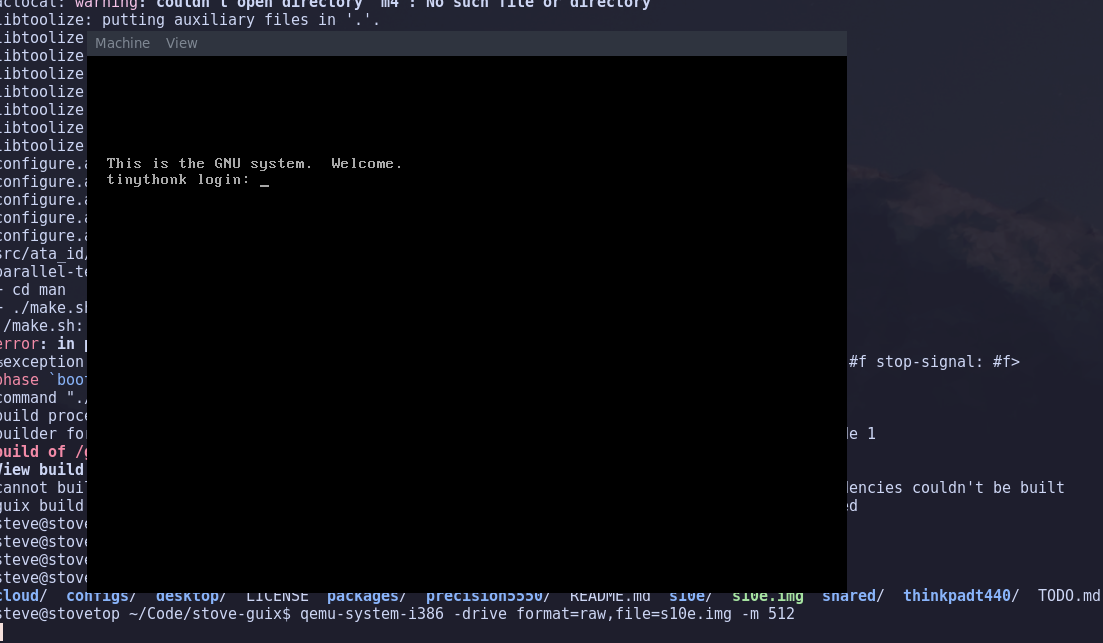
It boots all the way through with the Linux libre kernel with no issue. Having learned how to finally use these tools, I'm in a much better place than where I was blindly installing images hoping they just work. Now that I know that I can emulate an operating system file, let's move onto the next problem.
Trimming Guix
The earlier operating-system configuration above doesn't actually work. I saved this bit for later, but during some builds, a package was failing for a reason I didn't quite understand. I noticed alsa-utils, a package related to ALSA, was causing an issue.
I scanned the definition for both %base-packages and %base-services and saw no reference to ALSA anywhere. A common way to figure this out is to leverage guix graph to graph out all our dependencies in DOT format. But in this case, it doesn't help us since that's to scan for a package, not an operating system's configuration. Fortunately, I did notice something while scanning %base-services.
(service udev-service-type
  (udev-configuration
    (rules (list lvm2 fuse crda alsa))))
udev is linking to alsa-utils, and frankly I'm not too sure how to pick up on this connection using standard graph tools. Using guix system extension-graph shows a story about the service requirements, but doesn't really show between the two quite as easily since it's based on services, not exactly the packages themselves.
{{ img(src="udev_graph.png" desc="ALSA connects to etc, but not directly to udev it seems. Guix being able to export connection graphs of packages and services really shows off another cool feature of declarative package management.") }}
udev is responsible for pulling in alsa-utils at runtime, which was causing my build to crash. Could I simply just remove the 'alsa mention here and proceed onwards?
(modify-services %base-services
  (udev-service-type config =>
    (udev-configuration
      (rules (list lvm2 fuse crda))))
And surprise surprise, we continue to build until we hit another wall: kernel modules.
Since Guix can make use of either free or non-free kernels, I was trying to build this out with the free kernel until it became problematic, so I tried non-free. Same problem. Seems to be something about the firmware modules cannot be found, most likely because they probably don't even exist. I found that you can go through the Guix code to find the list of all the kernel modules used for initrd, and this is basically what I came up with for what works and doesn't work.
(define my-initrd
  (list
    ;"virtio_pci" "virtio_balloon" "virtio_blk" "virtio_net"
    ;"virtio_console" "virtio-rng" "virtio_mmio" "virtio_scsi"
    "ahci" "usb-storage"
    ;"uas"
    "usbhid" "hid-generic"
    ;"mmc_block" "dm-crpt"
    "xts"
    ;"serpent_generic" "wp512"
    "nls_iso8859-1"
    ;"pata_acpi" "pata_atiixp" "isci" "nvme"
    ))
Passing these in as initrd-modules to the operating-system makes the errors go away. I'll take a stab in the dark and say it could be due to the fact that we're cross-compiling x86/64 to i686, a platform that is not really used by anyone anymore. Could just be that nobody thought to port nvme to i686? Maybe, not sure. There's some other modules here tied to cryptography for perhaps things like LUKS, but I think we're well past the point of security being the dealbreaker here. I can mess with these later if I'm feeling experimental, I'm simply trying to get a bootable system.
Generating the Image
Guix has the ability to leverage the guix system command to generate an image file through another subcommand called image. With no external arguments, it will generate the entire image file you need byte-for-byte like I mentioned earlier. Nothing new here.
guix system image --target=linux-i686-gnu config.scm
However, we will run into another challenge: the root partition is not volatile. Accordingly, it seems like to generate the system image, we need a volatile root partition in order to build. But, there's no way to expose that setting from the CLI. We need to build an image object in Guile to pass into the image command instead. This has a more rigid interface for building images than passing CLI arguments.
This is an important section for another reason: this partition will also define the filesystem. When we copy an image file, we're also in turn copying bytes over to the disk, meaning we're copying the filesystem as well. Any partitions we define from earlier need to get mapped here. Normally on a Guix install, you do a prep step to write a filesystem to the disk before you begin doing the Guix install steps usually with parted or cfdisk.
Now, I have a 120GB SSD in this thing because I was feeling generous. That's the lowest size SSD I had, and frankly it made for a good test to see if it worked fine. But now that yields a different problem: we can't simply copy over 120GB of bytes. An image is simply copying 1:1 the bytes in the image file to the disk, and if we wanted to size this image to match the exact specifications, well... Our build would generate a 120GB image file. Not exactly a great idea for anyone's SSD lifespan.
To work around this, it's better if we expand the partition from the device when we're done, rather than burn millions of zeroes into the disk. It's good to start with a small image max size, something you could fit on a USB stick or such, and then expand the partition later via parted.
(image
 (inherit mbr-disk-image)
 (name 's10e)
 (format 'disk-image)
 (operating-system os)
 (partitions
  (list
   (partition
    (offset root-offset)
    (label "swap")
    (file-system "swap")
    (size (* 1 1024 1024 1024)))
   (partition
    (offset (+ root-offset (* 1 1024 1024 1024)))
    (label "root")
    (flags '(boot))
    (size (* 9 1024 1024 1024)))
   ))
 (volatile-root? #false))
The above is the partition format I went with. The goal is to have an MBR bootloader sector for the byte-0 bootload initializer code, then use the offset from that to have a 1GB swap space, and the remainder can go to the root partition. The reason for this order is that if you wanted to expand the root, but it came before the swap, the swap would have to be deleted and toggled via swapon/swapoff in order to move it to the end of the disk. By keeping it in front, we can more easily resize the root partition.
Our S10e has very little memory, so we will take advantage of swap space. I hate to sound like someone that has to explain the importance of swap each time I bring it up, but here it's pretty necessary since the S10e only comes equipped with 1GB of RAM. Should we go over that in memory assignment, at least programs will use swap instead of getting terminated by the OoM killer.
Let's make an image and verify our work by using parted's print command.
$ sudo cp /gnu/store/imagehashabcdefg-s10e s10e.img
$ sudo chown user s10e.img
$ sudo chgrp users s10e.img
$ chmod 0755 s10e.img
$ parted s10e.img print
Sector size (logical/physical): 512B/512B
Partition Table: msdos
Disk Flags:

Number  Start   End     Size    Type     File system     Flags
 1      1049kB  1075MB  1074MB  primary  linux-swap(v1)  swap
 2      1075MB  10.7GB  9664MB  primary  ext4            boot
Okay, so we get a roughly 11GiB image we can burn. Now we can boot it with QEMU to give it a test run.
qemu-system-i386 -drive file=s10e.img,format=raw -m 512
QEMU will appear with a tiny box and after doing the initial boot process, we get a login prompt. If you did not supply a login, you simply will not be able to log in. You can modify the password field of the user account, but it would be better to bind an SSH key to the user account so you can log in with ssh immediately, then use passwd to change the password on your OS.
At this point, I unplug the S10e's drive, plug it into a SATA-to-USB adapter (very handy to have FYI), and burn the file using dd just like I would any live Linux ISO file.
$ sudo dd bs=4M if=/home/steve/s10e.img of=/dev/sd<X>
$ sync
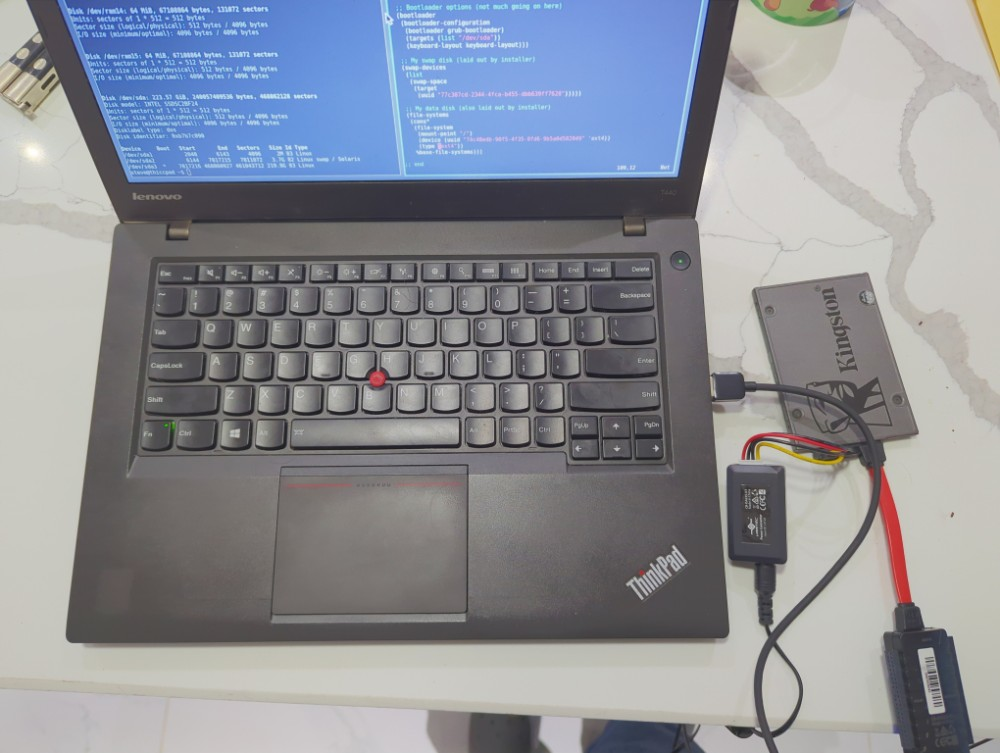
I throw an extra sync at the end of a dd call to immediately flush any write buffers to the disk to avoid having it done lazily. Now the only thing left to do is try and see if it turns on.
Unfortunately, after all that effort we're back at the same step: a blank screen. Turns out there's something that happens after the device turns on: the system tries to activate a VGA screen picture mode, and seemingly, if there is nothing there to take over the handoff, then the VGA screen will simply never do anything. Since we stripped out a ton of packages and desktop-related items, we can turn off any video outputs by disabling it in the kernel arguments, which gets loaded into the bootloader entry as extra arguments.
(define os (operating-system
 (host-name %hostname)
 (timezone "America/New_York")
 (locale "en_US.utf8")
 (keyboard-layout (keyboard-layout "us"))
 (kernel linux)
 (kernel-arguments '("quiet" "nomodeset"))
 (firmware (list linux-firmware))
 (initrd microcode-initrd)
 (initrd-modules my-initrd)
 ...
Had I known this some months ago, maybe this would've went a lot differently. Oh well, one quick reflash and let's try again.
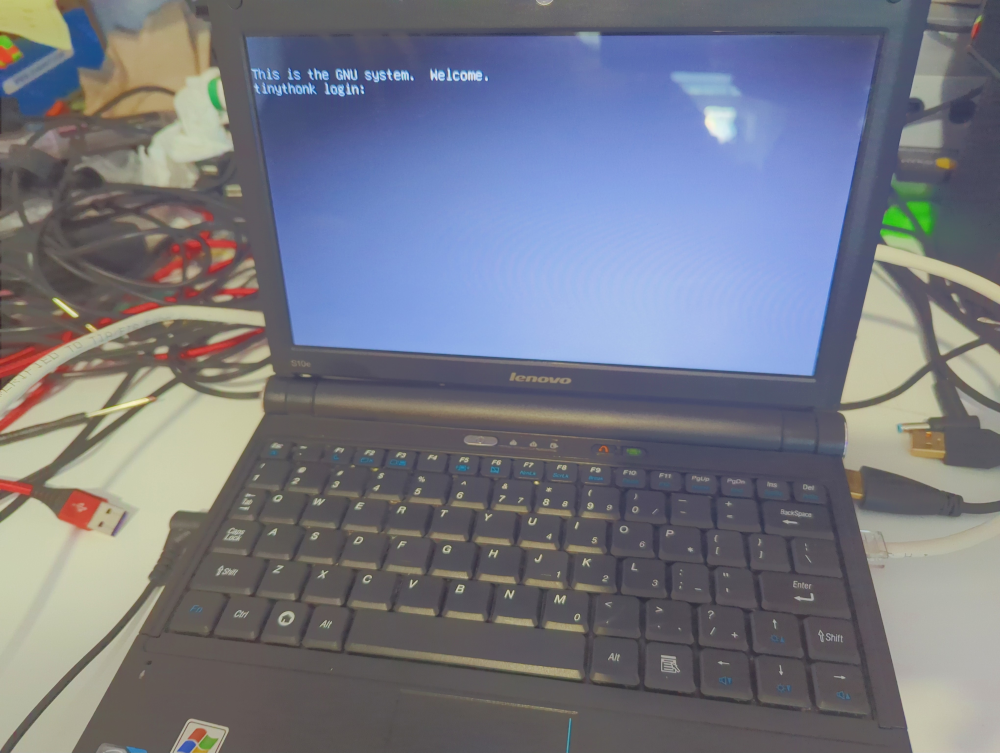
We are now in a complete TTY mode and able to log in using either a dummy password or an SSH keyfile.
Deploying Remotely
This is obviously not a scalable way of doing upgrades. Not in the slightest. I do not want to have to unscrew the back plate of the S10e, remove a drive and pop it into my desktop each time I want to perform an upgrade. The wireless card it has does not seem to want to work either, even with nonfree drivers included. The ethernet port, however, is fine, and I can even ping outside IPs and ssh to another machine on the local network.
But now we enter the second stage of this project: how do we update and manage the S10e without having to re-flash the disk? Well you could simply guix pull on the device itself to keep Guix commits up-to-date and pray that substitutes are in place. Or we can leverage a Guix feature called deploy. We're going to need a few extra steps to incorporate this feature.
Guix Keyring
guix deploy is a feature that takes a list of machines paired with operating system configurations and attempts to build the entire thing, not unlike systems like Kubernetes. One machine will act as the build machine, while we supply a list of targets to apply said updates to. We can pin 100 operating systems to 100 machines, or one operating system to 100 machines. For our sake, we map one operating system definition to our S10e.
A Guix machine will not accept updates from a random machine, and I think we can understand why. Beyond the connection public and private keys, some kind of trust should also be established between the build machine and target host. For this, the target host needs a key identifying the build machine, and we unfortunately will have to pack a new image to burn to disk because of this change.
First we need to create our signing key.
guix archive --generate-key
This is part of the archive subcommand of Guix that deals with archiving packages, and it also maintains the list of keys that a machine could accept when downloading archived packages. Should we want to add a new key to our target host, we can do so with another Guix command.
guix archive --authorize < /etc/guix/signing-key.pub
But, that's not the long term solution. If you were to re-apply an OS upgrade, that key would no doubt get wiped as it's not a correct means of managing it. Instead, we should add the key directly through the configuration itself so that it is defined declaratively instead. The minute you do a guix deploy with the manual authorization, you will not be able to do another deploy after until you authorize the key again.
To accomplish this, we need to take our signing key and attach it to our configuration. We can simply verbatim paste it into the config as an exercise, but later it should be moved to something a little more permanent so it doesn't stay an ugly blob forever. We need to append our signing key to our list of approved signing keys. And yes here we will have to burn the disk image for the last time to make this change permanent.
(services
  (modify-services %base-services
    (guix-service-type config =>
      (authorized-keys
        (cons*
          (local-file "signing-key.pub" "(pubkey ...)")
          %default-guix-auth-keys))))))
While we're here writing our disk for the final time, I will skip a secret and mention that we are going to need passwordless sudo. The account connecting needs root permissions to modify the system, and as such we need modify the sudoers file to give us the ability to do that.
(sudoers-file
 (plain-file "sudoers"
   (string-append
     (plain-file-content %sudoers-specification)
     (format #f "~a ALL = NOPASSWD: ALL~%" %user))))
Another image rebuild, another dd to the disk, and we'll have an OS with our signing key set. So long as you're not making a habit of regenerating your keys, this should be a decently long term solution until key rotation becomes a threat model.
Guix Deployment
The last step before we can begin a guix deploy is to create a manifest for the deployment. We need a list of targets, hostnames, information on how to connect to them, the user... The works. It's not as simple as telling Guix to connect to a host and do its thing.
The manifest for the deployment isn't really that complicated. It's a list of things to connect and perform a deployment to. We connect, we inspect, and we generate a difference payload and submit the changes. Each host could be on a different type of state, and frankly I don't have enough field experience to know what happens when one machine is a little further ahead than another. Or if the build host is behind a target host. I'd be interested to find out though.
Here's a sketch of my S10e, using an operating-system record defined as %os.
(list
  (machine
    (hostname %hostname)
    (user %user)
    (operating-system %os)
    (identity "/path/to/your/ssh/id_ed25519")))
The scariest part of all is now actually performing the deploy. But the transactional property of Guix ensures that if a build cannot happen, then it does not impact the running system. Going from our previous image build to our new deploy system shouldn't add anything new into the system, so we can simply run it with no modifications to the system manifest.
guix deploy config.scm
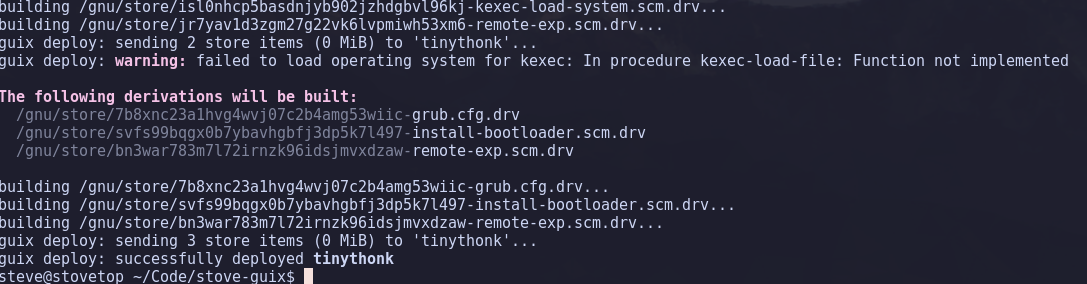
Even if we only have my tiny S10e here, it's pretty cool to visualize how you can control and deploy your entire lab or network of hosts with just one command. You can deploy hundreds of hosts, all with the same OS, and deploy upgrades with one quick tap in the CLI. Since it's all Guile Scheme underneath, you have a full-blown programming language at your disposal as well, so you can generate your own automations with basic Scheme code.
Fundamentally, I now believe this is the end game right here for all operating system automation and reproducibility.
Closing Out
The S10e largely hasn't been part of the story much. Functionally, it's been pretty okay. The one drawback is that there is no desktop software on this thing yet. But that hasn't been a drawback for me at all still. I like the TTY, I know how to navigate and use it, so it's fine for my uses. In fact, on a battery this old, higher-performance applications would no doubt contribute to significantly worse battery life while I'm on the go.
Because of its architecture and the extreme limitations, there's not too much I can do here. Guix commits will focus on safe builds and compile specific targets so long as x86 can compile down to i686 fine. If I can get a certain commit to compile some software correctly, then I can feel confident to pin the packages to a specific commit and use the time-machine functionality to freeze Guix in place for it. I can also use that s10e.img I generated earlier and throw it onto my NAS for safe keeping and use it as a reliable OS backup when something with the disk inevitably goes wrong.
I think the S10e currently as it stands fits weirdly as a nice little laptop for an escape from modernity and can be used for when you really want to focus on tasks at hand. No browsers, no internet, no distractions, you sit in a TTY and install the tools you need and focus on the task at hand. It's a polar opposite from my Surface where I have tabs and tabs of Firefox open looking at docs and writing code. Sometimes I may want one or the other, and adding the S10e to a rotation of devices I can use is great, and saves it from the landfill for a few more years.
Using htop to benchmark the system, it doesn't really use too much memory. Although my fonts are a little wonky. Accordingly, it's not really using anything more than roughly 100MB of memory.
{{ img(src="htop.png" desc="I think the font packaging may have gotten slightly messed up, but it's still very usable regardless. htop is a mainstay program for any computer admin.") }}
Let's say I forgot to install vim on the S10e. How long would it take for me to build it from my desktop and install it? I ran a time guix deploy config.scm to see what would happen.
$ time guix deploy s10e/config.scm
The following 1 machine will be deployed:
  tinythonk
...
guix deploy: successfully deployed tinythonk

real	1m41.506s
user	0m2.618s
sys	0m0.159s
{{ img(src="vim.png" desc="I normally am an Emacs user, but without some heavy customization, normal Vim for me is just fine. In fact I tend to use Vim bindings in Emacs since it makes Emacs way easier to use.") }}
I even have an action shot of Vim on the train, although it predates Guix.
{{ img(src="train.png" desc="For a while I was bringing the S10e on the train with me to try it out. Pretty healthy battery life for being over a decade old.") }}
What about basic work, can it run Python? Well, if you install it just like have been doing, then you will get an i686-compatible Python runtime, meaning you could probably install most Python third-party packages so long as no x86-specific extensions were needed, or hard 64-bit types in the CPython runtime. One quick python added to our packages and deploy later:
{{ img(src="python.png" desc="The best part of runtime-based languages is that they generally play pretty well anywhere they can compile. I'm sure Haskell would work just fine too.") }}
$ echo "<html><h1>Hello World</h1></html>" > index.html
$ python3 -m http.server
{{ img(src="helloworld.png" desc="Hosting a Hello World webpage on my S10e using the standard Python HTTP server. Should we host websites on our netbooks? And other ridiculous questions we could ask ourselves.") }}
While maybe not the most useful desktop experience in the world to some, I think it's an interesting piece of hardware to have equipped with Guix as shown. I've learned my fair share of lessons with Guix, things I ordinarily would not have dug into I got to experience first hand. The oddly exciting part about i686 is the learning opportunity to design new software that supports older architectures while not feeling totally stuck in the past. Low memory and low performance means all sorts of new challenges to think about when writing programs for myself. Maybe I can start with some basic applications and slowly work my way up the ladder to eventually make a game cross-platform support i686 with a language like Rust.
My apologies for the long wait. This story took several months to finally finish, and I still wouldn't say it's totally complete. I need to figure out what combination of software can be used to give me a minimum desktop experience so I can toy around with graphical applications, perhaps XFCE or a window manager like Openbox.
The code listed here is not going to be kept up-to-date. The best place would be to follow my Guix repository and check it out for yourself. I am doing my best to keep detailed notes with all my hardware to keep note of what works and what doesn't as I go along. I can take what I learned here and start managing my homelab with guix deploy for multi-machine setups.
Thanks for spending the time reading! Lots of work ahead of me, but hopefully I'll have something not Guix related next time. May finally start doing audio work like I've been putting off for months. If you're interested in declarative Guix operating systems, hopefully what I've detailed will help you start on the right track.