I honestly have not been around much as of late. A lot of things have been going on, and my April has been filled with family tragic events, to the point that it had an effect on my mental mood. I wasn't programming or writing much of anything for the last few weeks.
Despite all that, I finished up my most recent project which I will be talking about here. I started it back in March, and it took me until only a few days ago to finally have it uploaded and everything. It sits roughly at around ~500 lines of Rust code, but it'll grow as I add more comment strings.
Primer on MIDI
I have been into music creation for so many years now, but I wouldn't call myself a musician in any sense at all. I like the programming aspect, and the resultant output of programs that create sound. Much of this is achieved via MIDI, and I have many physical MIDI devices I've collected throughout my time.
MIDI is a format by which any and all electronic music devices operate on, and allow software and hardware to play well together. Foundationaly, MIDI when it was first introduced was game-changing, and created a whole musical market for digital devices and software to enable musicians of the next generation.
I'm accustomed to physical hardware MIDI interfaces, and I've written software before in Pure Data to generate MIDI signals to send to hardware interfaces for quite some time now. But this time around, after looking at my Novation Launchpad first generation, I wanted to do something different. It wasn't that long ago that I produced a game on the thing, so I wanted to do something more geared towards musical production.
So I set out to create an arpeggiator, the most basic sequencer program type I can think of. Back then, I did not know it would take me far over fourty-five days finish, however.
Arpeggiation Basics
Arpeggio is the function of creating a melody from a series of notes in a repeated fashion. It's used in many places in music, but I guess the best way to describe it classically would be with some Chopin.
The core idea is that you set a melody, and an arpeggiator will loop through the beats over and over, defining an easy pattern to use as a backing melody in a song. Arpeggiators are not common place anymore I would say, as electronic music production simplifies the process of creating new music. Arpeggiators are fairly common place in something like drum machines rather, because the core ideas are the same; looping over a series of notes in a repeated fashion.
The algorithm, in my head, was as follows:
1. Create a table of notes and a timer set to a BPM speed
2. Iterate over the table of notes one index at a time
3. Flush the note outwards if the note is 'active'
4. Repeat when index hits the end of the table
5. Read user input from the device and adjust notes in the table
Not all steps here are equal in functionality. The reading user input process is much more complicated than simply looping over a note table. But the other components are fairly simple. But in order to keep things relatively in-sync with the time measure, how do I gauge how long to pause actions for, and can I find a way to synchronize it so notes are never played out of sync with the beat?
Scheduling
Gathering user input, sending MIDI messages to the output bus and changing LEDs on the physical device are all things that can take variable amounts of time to execute, so getting these things done while also staying on beat is a challenge to do. Many of these things can happen at different intervals, too. Reading user input can happen at almost any second, while writing MIDI messages only happens every so often. Not to mention the state changes from one table index to the next, things need to happen with a certain level of synchronicity.
So I started writing something I don't ordinarily write very often: a job scheduler. Once upon a time when I once took a course on operating systems development, this sat at the core of the course to make sure things happen autonomously and with a high degree of precision and certainty. It however had been a number of years since, but I had the right idea to do this as it turns out.
First my goal was to break down all the different actions into different categories. There's user input, program state change, and note flushing. These all need to happen within fixed time intervals to ensure not only correctness, but usability. The user input should be slightly near instantaneous, as to not feel sluggish, while the program needs to update it's state and reflect that on the physical device.
Here I got started in Rust, with a simple enumeration representing messages to pass around.
pub enum Message {
    UserInput,
    UpdateState,
    FlushNotes,
}
The variants don't really need to hold additional data. What comes next is a data type to store the message and timing information as a job. I refer to the timing as "ticks" like a tick of a metronome. When a job reaches it's maximum number of ticks, it should be executed by the program.
pub struct Job {
    current_ticks: usize,
    max_ticks: usize,
    msg: Message,
}
Later I realized it didn't make too much sense to write a fixed-type job struct pinned to my message enumeration, so I decided to make it based on a type parameter instead for it to be re-used later in life.
pub struct Job<T> {
    ct: usize,
    mt: usize,
    msg: T,
}
Now for the scheduler's definition that contains all the job information.
pub struct Scheduler<T> {
    tick_duration: std::time::Duration,
    last_time: std::time::Instant,
    jobs: Vec<Job<T>>,
    queue: Vec<T>,
}
From a conceptual standpoint, the scheduler is going to execute at the smallest time interval possible on a loop and update each job to add a new tick onto each one. Once they reach their maximum tick count, they are reset to zero and copied onto the queue. The tick duration and last time fields are there to help us calculate how much time we need to rest our executing thread for.
One thing about vectors is hot allocation when they reach capacity, and I don't want my scheduler to be allocating memory during the program, so I use Vec::with_capacity() to set both vectors to have a size of about a hundred elements each, which is plenty for this type of program. Though hopefully memory allocation never really takes a toll as it's a tightly-bound program. The queue's elements will have to be cleared occasionally, but that's it.
Now for a longer piece of code to show the scheduler's full implementation.
impl<T: Copy> Scheduler<T> {
    pub fn new() -> Scheduler<T> {
        let jobs = Vec::with_capacity(100);
        let queue = Vec::with_capacity(100);
        Scheduler {
            tick_duration: Duration::new(0, 0),
            last_time: Instant::now(),
            jobs: jobs,
            queue: queue,
        }
    }

    pub fn has_events(&self) -> bool {
        self.queue.len() > 0
    }

    pub fn clear_queue(&mut self) {
        // delete all items from queue
        self.queue.clear();
    }

    pub fn interval(&mut self, tick_amt: usize, msg: T) {
        self.jobs.push(Job {
            ct: 0,
            mt: tick_amt,
            msg: msg,
        })
    }

    pub fn set_rate(&mut self, bpm: i32, num_ticks: i32) {
        let ms = 60000000.0 / (bpm * num_ticks) as f64;
        self.tick_duration = Duration::from_micros(ms as u64);
    }

    pub fn update(&mut self) {
        for job in &mut self.jobs {
            job.ct += 1;
            if job.ct == job.mt {
                job.ct = 0;
                self.queue.push(job.msg);
            }
        }
        // trigger a thread sleep HERE
        let new_time = Instant::now();
        let elapsed = new_time.duration_since(self.last_time);
        let delta = self.tick_duration - elapsed;
        thread::sleep(delta);
        self.last_time = Instant::now();
        // end sleep calculation
    }
}
For the most part, it's sort of self explanatory except for the last few methods. The rate we set is a careful f64 calculation dividing 60 seconds as microseconds against our target BPM multiplied by the number of ticks we want the program space to have. The more ticks you have, the smaller the tick duration will become as it tries to divide time further into even slices, but floating-point imprecision can become an issue. My default tick rate is 64, which I don't think causes any floating point problems.
Pushing a job onto the job list using the interval() function will define a job with a specific timing interval based on ticks, not actual time. Because the BPM can be variable, it's better to convert all time measures into ticks, and leave precise time calculations to the update() function.
The update() function will loop through all jobs, bump tick counts, and copy them over to the job queue if a job is ready to be executed. Then, after that, we need to sleep for a precise amount of time and pause the operating system's thread. But the amount of time that has passed between all these actions is variable too, so we need to calculate a difference between our last update call to now, and then take the difference of the time passed against our target tick duration, and sleep that amount. The reliability here depends fully on the operating system's capacity and ability to sleep a correct amount of time, and thankfully on my system, it seems to work fine.
Now with a working scheduler, later in life we'll use it as part of our arpeggiator, but it looks something like this.
sched.set_rate(120, 64); // 120 bpm, 64 ticks
sched.interval(4, Message::UserInput);
sched.interval(32, Message::UpdateState);
sched.interval(32, Message::FlushNotes);

while true {
    sched.update();
}
Device Handling
Using the Portmidi library, based on some old code I had that I was porting forward, it came to be that lifetime markers were now required to represent the connection from software to hardware. Perhaps due to the complexities between Rust objects in program scope and how a physical hardware interface could seemingly fail at every possible step in a program, it was for the best. But it took some effort to learn how to utilize the lifetime annotations.
Portmidi provides a few different data types for working with MIDI interfaces. Namely, everything starts with a Portmidi context type that you can use to initiate virtual device objects. What we need or at least care about, are the ports initiated by Portmidi to create the input and output streams to a physical hardware device. Though I wish I could say it w ere as simple as "take a string and find me a hardware device", it's a bit not like that.
Portmidi's Rust library is a frontend FFI for C code, and the only way to identify a device is to use an integer. We can't pass it the name of a device, and simply put I wouldn't want to have to remember specific integers for different hardware devices. Instead, you can iterate over all known MIDI interfaces in Portmidi and locate your device that way, which I do indeed do.
for dev in ctx.devices().expect("Failed to query devices") {
    println!("Device: {}, id: {}", dev.name(), dev.id());
}
Upon locating the exact integer of your target device, you can then pass that integer ID off to Portmidi to create device streams that you can read and write from/to.
let in_dev = ctx.device(in_id).expect("Failed to get input device");
let out_dev = ctx.device(out_id).expect("Failed to get output device");
let input = ctx.input_port(in_dev, 1024).expect("...");
let output = ctx.output_port(out_dev, 1024).expect("...");
It's tiring, it's explicit, and I still haven't made this necessarily panic-free, but it works well. Now to throw it all together into a very cumbersome-looking constructor.
pub struct Device<'a> {
    pub input: pm::InputPort<'a>,
    pub output: pm::OutputPort<'a>,
}

impl Device<'_> {
    pub fn new<'a>(
        name: &'a str,
        ctx: &'a pm::PortMidi
    ) -> Result<Device<'a>, String> {
        let mut output_id: Option<i32> = None;
        let mut input_id: Option<i32> = None;

        for dev in ctx.devices().expect("Failed to query devices") {
            println!("Device: {}, id: {}", dev.name(), dev.id());
            if dev.name() == name {
                if dev.is_output() {
                    output_id = Some(dev.id());
                }

                if dev.is_input() {
                    input_id = Some(dev.id());
                }
            }
        }

        match (output_id, input_id) {
            (Some(oid), Some(iid)) => {
                let out_port = ctx
                    .device(oid)
                    .expect("Failed to find matching output device");

                let in_port = ctx
                    .device(iid)
                    .expect("Failed to find matching input device");

                Ok(Device {
                    input: ctx
                        .input_port(in_port, 1024)
                        .expect("Failed to open input port"),
                    output: ctx
                        .output_port(out_port, 1024)
                        .expect("Failed to open output port"),
                })
            }
            _ => Err("Failed to create a device context".into()),
        }
    }
}
I add some of my own workarounds here. When we search for matching device integers, I instead choose to store it as an Option<i32> instead of some raw i32 value. It plays better with the match syntax later to match and execute when exactly both integers have Some(x) value instead of if they are non-zero or not (or non-negative?). I think I could do with some improvements, but that might just be for later.
To use this, we pass a string of the name of the device (found by printing the queried devices) and the Portmidi context itself.
let ctx = pm::PortMidi::new()?;
let name: &str = "Launchpad MIDI 1";
let lp = Device::new(&name, &ctx).expect("Failed");
Writing to the device, which we'll do quite a bit, is done as follows.
lp.output.write_message([0x90, 64, 127, 0])?;
Notice the ? at the end? That's because each and every read or write operation can fail, so the result of these operations is typically always a Result<T,E> type where the error value is a specific error labeled ffi::PmError.
To alleviate some typing, I aliased a new type to make code writing aspects a little easier on myself.
pub type MidiRes = Result<(), pm::Error>;
If you know anything about error handling in Rust, custom error types are usually a pain, but here it's been mostly encapsulated by the Rust Portmidi library wrapping errors in their own error enumeration. Otherwise, we would consider using Result<T, dyn Error> to use dynamic dispatch on objects that implement the trait std::error::Error, which may or may not come with issues about some things not having the Sized trait as well.
Anways, moving on.
Arpeggiator
The arpeggiator section of code itself is a bit of an amalgamation of everything mentioned, and I fear I shouldn't even begin to share the struct definition until I at least explain a few different things. There might be a lot going on here, so let me first talk about my application and interface planning.
User Interface
The Novation Launchpad is mainly an eight-by-eight grid of buttons, with additional buttons along the side for various control aspects. Below is a picture of my planned layout.
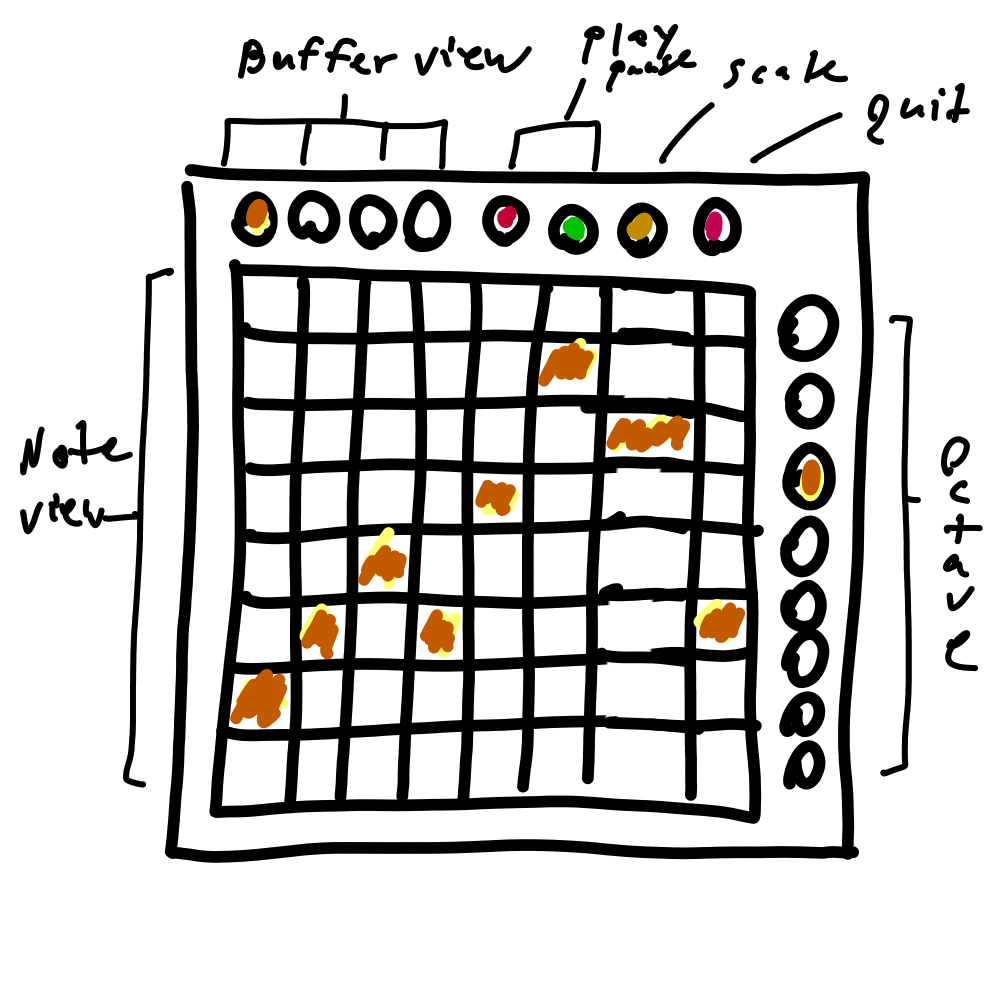
The goal I have is to have the main 64-button grid act as the note table for the arpeggiation, with each column representing a note to be played every eigth note. I want there to be additional buffers adding up to have a grand total of 32 eighth notes, making up at least four whole bars of music. Most arpeggiators probably don't want or need that many, realistically, but this is isn't exactly some paid professional software I'm engineering.
The additional buttons I have planned are for:
- to swap between four different "views" of the note array
- play/pause the arpeggiator
- swap the scale of the arpeggiator
- dedicated quit button
- control the octave with the right-hand vertical column
As far as a starter program, I think this is enough functionality to throw at this thing. I don't think it could handle much more, at least not without some advanced button hold-and-release timing mechanisms (one day).
Musical Scales
How many music scales do you know? I only know two, Major and Minor. There's way more than just that though, but the reality is that they just don't work in this 64-button grid context. Seven buttons is however just the perfect amount to use for a musical scale.
Each column will hold a note-like value between 0 and 7, where 0 is indicative of an "off" state for that column. The non-zero 1..7 range will then be translated to a musical scale accordingly via a lookup table array.
pub enum Scale {
    Major,
    Minor,
}

// Major: C D E F G A B
// Minor: C D Ef F G Af Bf
const MAJOR_SCALE: [u8; 8] = [0, 0, 2, 4, 5, 7, 9, 11];
const MINOR_SCALE: [u8; 8] = [0, 0, 2, 3, 5, 7, 8, 10];

fn calc_note(note: u8, scale: &Scale) -> Option<u8> {
    match (note, scale) {
        (1..=7, Scale::Major) => Some(MAJOR_SCALE[note as usize]),
        (1..=7, Scale::Minor) => Some(MINOR_SCALE[note as usize]),
        _ => None,
    }
}
Based on a scale and a u8 value representing a note, we can grab a new base note from the given scale array and return a Some(note) kind of type. If the note and scale don't match, we simply return a None. Why are my scale arrays an extra element long? Mostly because scales have seven notes, but to avoid having to do index subtraction I think it was simply easier to add an extra zero. If I was being snippy about saving two bytes of stack memory, I would change this.
User Inputs
I mentioned earlier that user input processing is a far more annoying task than most others here. If there were no user input, this program wouldn't be very complicated.
First, let's make a function called check_inputs(). The goal of this function is to handle user input from the device, inspect each message, and pass it along to the correct places. MIDI interfaces are simple analog electronics; they are either pressed or they are not pressed, with some devices having sliders, everything is mostly analog. When a button is pressed, the host device receives an interrupt signal and records a timestamp of it and noting it's voltage values representing a few different values. Namely:
- the kind of MIDI message it is
- the note of the MIDI message
- the velocity of the note
- the channel it was sent/received to
Many MIDI devices adhere to this basic standard, but some devices have their own interpretations of this standard message interface layout. For our case, our device can only send two kinds of messages, a MIDI message and a "note" message. The MIDI message is more like a control-ish type of message where the note message is more general purpose. When plugging synthesizers and software around, the MIDI kind of messages are not exactly ones you want sent to the synthesizer, but a message you may want to pass along to a digital audio workstation instead for various purposes like beginning or ending recordings, changing instruments, or what have you.
When we receive a message from the device, we will have to inspect it's type of message, and then pass along the remaining values to other parts of the code. In our case, the top row of buttons are MIDI, while the main 64-button grid is a note type. To read from the device stream, we need to poll some data from the analog signal via the Portmidi library, and have Portmidi convert the bytes into a MIDI stream of events.
const MIDI: u8 = 0xB0; // 176
const NOTE: u8 = 0x90; // 144

fn check_inputs(&mut self) -> MidiRes {
    if let Ok(Some(evts)) = self.grid.input.read_n(1024) {
        for evt in evts {
            let status = evt.message.status;
            let note = evt.message.data1;
            let vel = evt.message.data2;

            if vel == 0 {
                return Ok(());
            }

            match status {
                MIDI => self.top_row_dispatch(note, vel)?,
                NOTE => self.grid_dispatch(note, vel)?,
                _ => {}
            }
        }
    }
    Ok(())
}
Ignoring what the two inner function calls do, the idea is to route the messages to the correct places in the program so that the input can be handled correctly. In the case of the top-row elements, that's more for updating program state and changing the UI LEDs, while the grid is for note processing.
Scheduler, Part II
We made a job scheduler earlier, now we get to use it. Again, ignoring some of the functions we haven't gone over, here is how it is used.
fn update(&mut self) -> MidiRes {
    if self.scheduler.has_events() {
        let mut i = 0;
        while i < self.scheduler.queue.len() {
           match (self.scheduler.queue[i], self.playing) {
               (Msg::Quit, _) => self.quit(),
               (Msg::CheckInputs, _) => self.check_inputs()?,
               (Msg::UpdateState, true) => self.update_state()?,
               (Msg::FlushNotes, true) => self.flush_notes()?,
           }
        }
        self.scheduler.clear_queue();
    }
    Ok(())
}
Using our previous Message enumeration (that I've since renamed, amongst other things), we map out the goals of this music program. We match against anything in the active message queue and execute it. However, only some actions will get executed, because the arpeggiator program may be in a "paused" state, so things like updating internal counters or sending notes outwards will simply not happen unless the device itself is playing.
Each and every action has an associated ? operator to deal with the case where a read/write from the physical device may fail, so we do have to gracefully bubble the errors upwards respectively. Except the quit() function.
Since the scheduler has it's own update() function, we need to run our own internal state along with it. So to wrap it into a nice and easy to use interface, I simply create a run() loop function.
fn run(&mut self) -> MidiRes {
    while self.running {
        self.update()?;
        self.scheduler.update();
    }
    Ok(())
}
Controlled entirely by the self.running Boolean value, this will run until we get a Msg::Quit button somewhere in the scheduler, or if the user input hits the designated quit button.
Now we can focus on the next few aspects of handling input, flushing notes, and closing this project up and moving onto the next thing.
Death
It was around the first week of April that it was announced that one of our family members passed away. They were a close relative and had been almost all my life. It was sudden, unexpected, and truly heart breaking. I didn't really know how to process it at first. They were at my wedding not even all that long ago.
The process for the passing had taken some time, and unfortunately the situation never improved. I don't think I processed it very well, either. Soon we had funeral arrangements made, had family come from all over, and we said goodbye. I was incredibly sad that day, and still feel sad writing this weeks after the fact.
Grief has a strange way of taking a toll on you in ways you don't really expect. You think you're fine, until you try to move on from it one day at a time. I stopped working on the Launchpad arpeggiator once I learned he passed, and spent more time just appreciating life and staying away coding. I spent a little more time outside, spent more time with friends, and it took some time to feel normal again.
Then, once a few days have gone by, we're struck with yet another tragedy: someone on my wife's side passed away, not even a week from the last funeral. It was a weird, cruel joke that I at first didn't even entirely believe. I was already in a slight daze after the first one, that the second one really took both of us by surprise.
So again, more time with family, more focusing on each other, and more trying to repair some holes in our hearts. April wasn't even half way over, yet I already wish it was.
I think it will still take some time to mourn and move on, but I'm just glad I have my friends and family with me in this moment. It's these kinds of times when you have to be appreciative of what you have in the moment, and maybe sometimes just step away from the keyboard every now and again.
Final Touches
I have a lot in place, and the last few sections will touch upon some of the more difficult bits about keeping the system in a relatively sane state.
State
Last I left off, we touched on how the scheduler works, how receiving input works, but we never fully examined what is going on under the hood. As I fleshed this program out over the last month, some things were easier than others to do, like turning on LEDs or testing the scheduler. Yet we never fully touched upon what our internal state quite looks like.
I already talked about our concept of columns, and how the user touches a key on a certain XY position, the program will store the column it touched and the Y-value, and reflect that into the MIDI output later. First, how do we calculate an XY coordinate from our grid?
Each button on the grid is relatively in sequence, and each row is a multiple of 16. Each row starts with a zero, each button then adds one in sequence, until we reach the end of the row and then roll over to the next. This function accordingly will determine if a MIDI value is from the grid or not.
fn find_lp_xy(x: MidiVal) -> Option<(u8, u8)> {
    let nx = match x >= 16 {
        true => x % 16,
        _ => x,
    };
    match nx < 9 {
        true => Some((nx, x / 16)),
        _ => None,
    }
}
Leveraging my favorite type, the Option<T>, it will return a pair of bytes if it's on the grid, and None if not. We can then use this for the grid_dispatch() method from earlier to dictate the column mutation. Simply by taking the resultant x variable tells us our target column, with the respective y value being the "height" by which we want to set it.
First, what does our table of notes look like? Is it an array of pure integers? It very well could be, but I instead opted for an array of structs instead, called ArpCol.
#[derive(Debug, Copy, Clone)]
pub struct ArpCol {
    pub val: u8,
    pub note: u8,
}

impl ArpCol {
    fn new() -> ArpCol {
        ArpCol { val: 0, note: 0 }
    }
}
For something that only has two u8 values, I could compress it into a u16 and do bit shifting, but I was hesitant on that because I am not a bit shift master when it comes to shifting into smaller values (ie. u16 into a u8), and felt it would be far simpler to generalize it as an object instead.
Our arpeggio buffer will then be an array of thirty-two elements of this struct, generated this way.
buffer: [ArpCol::new(); 32],
Which I think looks weird at first, but it is sure simpler than looping over the array myself. Because ArpCol inherits the Copy trait, we can do this and it'll copy it over to every struct in that new array.
Now, to handle messages that were dispatched previously in check_inputs().
fn grid_dispatch(&mut self, note: MidiVal) -> MidiRes {
    if let Some((x, y)) = find_lp_xy(note) {
        if x == 8 {
            self.grid_io.output.write_message([
                NOTE, self.octave_btn[1], 0, 0
            ])?;
            self.octave = 7 - y;
            self.octave_btn[1] = note;
            self.grid.output.write_message(self.octave_btn)?;
            return Ok(());
        }
        let offset = ((self.buffer_index*8) + x) as usize;
        let new_val = 7 - y; // inverting the value

        let column = &mut self.buffer[offset];
        if column.val != new_val {
            // turn off old LED if there was a non-zero value
            if column.val != 0 {
                self.grid.output.write_message([
                    NOTE, column.note, 0, 0
                ])?;
            }

            // and turning on the new LED
            if new_val != 0 {
                self.grid.output.write_message([
                    NOTE, note, 127, 0
                ])?;
            }
            column.val = new_val;
            column.note = note;
        }
    }
    Ok(())
}
There's a lot going on here, so let me clarify.
The Launchpad I use is not really an eight-by-eight grid, but in actuality a nine-by-eight grid with one ninth column. The ninth column is treated sequentially, so our find_lp_xy() function will yield a value of (8,y) for any value that falls on that last column. That column I want to control the octave of the program, acting similar as the other columns, and has it's own associated array of data to use to turn on and off the active LED.
Secondly, if the input falls within the main grid, we need to find an associated column in the array and adjust it's values, as well as turning off the previously held LED if the column was active or not, reason why ArpCol has two integers and not just one. If there was an active LED, we disable it, then enable the new one. If the bottom-most button is pressed, the column is turned off entirely.
Since we can only access eight elements in one view, the self.buffer_index value is controlled by the top-row of buttons instead to swap the view between 0..3. That is handled by top_row_dispatch(), which I'll showcase here.
fn top_row_dispatch(&mut self, note: MidiVal) -> MidiRes {
    if note < 104 {
        return Ok(());
    }
    let idx = note - 104;
    match idx {
        0..=3 => {
            // if the target buffer is different than current,
            // reflash the entire UI and change the buffer index
            // mutate the buffer highlighted button as well
            if idx != self.buffer_index {
                self.buffer_index = idx;
                self.buffer_btn[1] = note;
                self.render_ui()
            } else {
                Ok(())
            }
        }
        4 => self.pause(),
        5 => self.play(),
        6 => self.invert_scale(),
        7 => Ok(self.quit()),
        _ => { Ok(()) }
    }
}
There are eight buttons with their own associated value, and four of those buttons are reserved for buffer swapping. When a user clicks on the buffer buttons, they are shown a view of that section of the arpeggio, which in turn involves reflashing the entire device with correct information. A quick MIDI reset code turns off all LEDs on the device, and we have a special function called render_ui() that renders each and every aspect correctly to the device. Some care is taken to avoid doing a full refresh, like in the case of the user pressing the same buffer button as the active view, which we check for to avoid doing a useless render_ui() call. The other actions in this code are pretty self-explanatory.
Visual Tracking Aid
Apart from listening to audible feedback, there is no visual element to the arpeggio to tell us exactly which note we're on. The best way to do that would be to possibly color the currently active column, but I had a moment of hesitation on that because it would add some more complexity to each ArpCol struct by then having another property to see if it was the active column or not.
You could consider avoiding that by instead having a separate variable outside that tells you what the current active note is, but preferrably I decided to do something else. I instead want a visual tracker at the bottom row of the grid telling me the column that way.
This sent me down a minor rabbit hole of how to implement something like this, and in turn, I went a different direction entirely.
Imagine a regular window-based program. Multiple windows with different functionality to control the program at different aspects. When you click, how do you tell what window event to process? For now I've been doing direct writing to the LEDs for visual UI changes, but what if I had a means of dynamically adding widgets for interactivity?
This method for me didn't work, but I can show you why, and what may change in the future.
Widget Approach
Let's picture we instead want to compose our program out of smaller bits instead of having one gigantic mess of a program. This is where using traits would come in heavily. Instead of hard-coding logic like which LED to write to, we could ideally separate the entire arpeggiator into a list of components that modify a shared state of some kind. It would involve decoupling the state of our program away from our current implementation, but I can show why that might be a good thing.
First a Widget trait. Each widget would need to get updated somehow, so we need an update() function. Perhaps we need a render() function to be able to even draw it to our device.
pub trait Widget {
    fn update(&self, MidiVal, &State) -> MidiRes;
    fn render(&self, &Device) -> MidiRes;
}
Then, when we handle user input, as we receive a MIDI message, we can loop over each widget in a widget container and do some checks somewhere.
for evt in evts {
    for widget in self.widgets {
        widget.update(evt.message.data1, &self.state);
    }
}
Then when rendering the UI, we can iterate over all the widgets and only render the "active" widgets.
for widget in self.widgets {
    widget.render(&self.output);
}
The code is generic enough that specific implementations can code at a high level without having to worry about small component-level details. But my issue with this style of composition is that it's not tightly-bound enough for this domain I want to say. It would also require undoing a lot of my existing code, which wasn't created with this in mind.
First is finding which widgets to interact with. I could add a new method to the Widget trait, something like is_input(), to dictate if a message is within defined bounds of the widget.
for evt in evts {
    for widget in self.widgets {
        if widget.is_input(evt.message.status, evt.message.data1) {
            widget.update(evt.message.data1, &State);
            break;
        }
    }
}
The break is needed to stop iterating over widgets once we found a match. Each widget would have to be coded with some means of dictating if input is bound to it somehow. Ideally with minimal widgets, there wouldn't be too much looping anyway, but audio is a tightly-bound world of programming so excess is really bad for performance.
Now in some cases it would make sense to decouple as many components from one another so things are little tidier and some components have less access to things or something, but I originally wrote this as a program to remain in one file. The component widget style would do better for reusability, but I've yet to develop another application after this one, and frankly I'm not sure what would really be next quite yet. Maybe something more generative and fun than geared towards music creation I guess.
But if I could go back, I would probably try to go for something like a widget composition program instead. That way buttons could be coded as something like:
pub struct ButtonToggle {
    pub button_kind: MidiVal,
    pub button_code: MidiVal,
    pub button_vel: MidiVal,
}

impl ButtonToggle {
    pub fn new(type: MidiVal, code: MidiVal) -> Self {
        ButtonToggle {
            button_kind: type,
            button_code: code,
            button_vel: 0,
        }
    }

    pub fn is_input(&self, t: MidiVal, n: MidiVal) -> bool {
        n == self.button_code && t == self.button_kind
    }

    pub fn update(&self, v: MidiVal, s: &State) -> MidiRes {
        self.button_vel = v;
        // ...
    }

    pub fn render(&self, d: &Device) -> MidiRes {
        d.write_message(...)?;
    }
}
Sorry about that long tangent, now where was I?
Visual Tracker Part II
The visual tracking at the bottom row is something that needed to be handled, and my approach sort of looks like it would belong in the widget family of composition, but not quite. I first started with a struct resembling the following.
pub struct Tracker {
    pub index: u8,
    pub btn: BtnArr, // type alias to [u8; 4]
}
The goal of the tracker is to move the index forward by one tick each time the arpeggio moves a note forward, keeping pace with the current program execution loop. This logic is tightly bound to the arpeggio's update() function and needs some special treatment because of that. Putting it behind a layer of widgets would have added a lot of weird complexity.
The tracker can only render when it's within the current buffer range, so when it's on note index 3, it will draw only when buffer 1 is selected. Meaning the range to check for will be min_index < cur_index < (min_index + 7). I add a few methods to make it slightly easier to manage the visual cue tracker.
impl Tracker {
    fn new() -> Tracker {
        Tracker {
            index: 0,
            btn: [NOTE, 112, 127, 0],
        }
    }

    fn in_range(&self, buffer_index: u8) -> bool {
        let bmin = buffer_index*8;
        return (bmin <= self.index) && (self.index <= (bmin+7));
    }

    fn update(&mut self) {
        self.index += 1;
        if self.index == 32 {
            self.index = 0;
        }
    }

    fn move_right(&mut self) {
        self.btn[1] += 1;
        if self.btn[1] == 120 {
            self.btn[1] = 112;
        }
    }
}
The tracker itself is not responsible for it's rendering, only because (again) my code was not coded around the idea of component-style management. If I had a more decoupled means of sharing the device streams, I would consider re-doing this whole thing, but without direct access, I simply stuck to mutating a small array of integers instead. Mutating a small array is still easy enough, and this implementation alone doesn't have any side effects, so you could argue this code itself might never cause a real problem.
All that's left is really glueing it all together and talking about the update_state() function which sits at the core of everything.
Ticking State
Our arpeggio has an internal counter that we must update, and that counter is used as the index for the note array. Each time a call to update_state() is needed, it moves the counter forwards until it hits its limitation and resets back to zero. On top of that, each time the program is bumped forward, small UI changes will be needed as well, ones that are not glued to any particular process as of yet.
fn update_state(&mut self) -> MidiRes {
    // bump the note index counter
    if self.playing {
        self.index += 1;
        if self.index == 32 {
            self.index = 0;
        }
    }

    // turn off the tracker's previous LED
    // do this before we "move" the button
    if self.tracker.btn[2] != 0 {
        self.grid_io.output.write_message([
            NOTE, self.tracker.btn[1], 0, 0
        ])?;
    }

    self.tracker.update();
    self.tracker.move_right();

    // turn on the tracker's LED if it's "on screen"
    if self.tracker.in_range(self.buffer_index) {
        self.grid_io.output.write_message(
            self.tracker.btn
        )?;
    }
    Ok(())
}
First thing we do is take care of the index. This part can absolutely get re-written into a different struct, since I use this tick counter methodology in a few different places. Not yet though. After that, we need to play with the visual tracker, since that one sits outside of user input and is done autonomously.
Flushing Notes
Almost at the end, a remaining piece of the puzzle is writing MIDI notes outwards to a different port. The thing I wanted to do is be able to have my Rust program serve as the middle man between the Launchpad and any software synthesizer on a computer. It receives all input from the Launchpad, writes MIDI messages to the Launchpad, and writes MIDI notes to a virtual sink elsewhere.
Conceptually this part is pretty simple. We look at our current index, access the note array, and convert it to a musical MIDI note. Only if the column is considered active, however.
fn flush_notes(&mut self) -> MidiRes {
    let col = &self.buffer[self.index];
    if col.val > 0 {
        if let Some(base_note) = calc_note(col.val, &self.scale) {
            self.midi_out.output.write_message([
                NOTE, base_note+(self.octave*12), 127, 1
            ])?;
        }
    }
    Ok(())
}
Using the music scale lookup tables, it converts a column value to note, additionally offset by a defined octave, and writes it to our MIDI output stream (ignoring the weird redundant naming).
Rendering
Rendering is sadly a little uglier looking since there's a bit of duplicate code here from the tracker, but it's necessary for the moment until a new widget composition approach evolves.
fn render_ui(&mut self) -> MidiRes {
    // clear board for a full wipe
    self.clear_board()?;

    // draw UI elements
    self.grid_io.output.write_message(self.buffer_btn)?;
    self.grid_io.output.write_message(self.pp_btn)?;
    self.grid_io.output.write_message(self.scale_btn)?;
    self.grid_io.output.write_message(self.octave_btn)?;

    // draw tracker if it's on screen
    if self.tracker.in_range(self.buffer_index) {
        self.grid_io.output.write_message(self.tracker.btn)?;
    }

    // render all cells
    for c in 0..8 {
        let index = ((self.buffer_index*8) + c) as usize;
        let col = &self.buffer[index];
        if col.val > 0 {
            self.grid_io.output.write_message([
                NOTE, col.note, 127, 0
            ])?;
        }
    }
    Ok(())
}
It's pretty straight-forward. This is full-clear redraw of the whole "scene", and involves clearing the buffer and redrawing every element on a blank device. Because I don't have that fun widget approach, it involves a little manual labor in writing every call to each button specifically, as well as doing the logic for the visual tracker. Otherwise, running over all the columns and converting the value to a color value is simple since we just saw what flushing the notes looked like.
If the self.buffer_index was in a separate object, then we could spin the visual tracker into a widget and combine all the widgets into one list and centralize it all under one widget.render(&device) function, and that's where I think the program would look a lot better. Perhaps in the future programs I make.
Layout
The last thing to share is my struct layout for this program. I saved this for last specifically because it is confusing, and trying to explain it all in the best way involves explaining each individual aspect as I go along, instead of showing one gigantic mess of a definition.
pub struct Arp<'a> {
    pub midi_out: Device<'a>,
    pub grid_io: Device<'a>,
    pub running: bool,
    pub playing: bool,
    pub scheduler: Scheduler<Msg>,
    pub index: usize,
    pub buffer_index: u8,
    pub buffer: [ArpCol; 32],
    pub buffer_btn: BtnArr,
    pub pp_btn: BtnArr,
    pub scale: Scale,
    pub scale_btn: BtnArr,
    pub octave: u8,
    pub octave_btn: BtnArr,
    pub bpm: u8,
    pub tracker: Tracker,
}
The first two items are two different Portmidi devices. One is for the physical device, the other is a virtual output sink for sending our MIDI messages somewhere else in the circuit. Then there's our playing and running Boolean values, doing what they do best. Then our scheduler that holds jobs targeting our message type.
After that, it's a buffer index that we use to keep track of which column we're inspecting. Then the buffer itself, fixed as a 32-wide column buffer. Then it's every single button and button-related integer we need to render all the relevant items on the device. It's definitely hideous to look at, but for now, it does work.
Compiling Pure Data
I need to test this somewhere, and sadly the only method I know best is using Pure Data. Pure Data normally is a great toolkit for coders to throw together audio programs since it can do just about anything you need it to. It however, did not want to play ball at first. And I soon discovered why.
Pure Data is normally a program you can compile to make it work with Portmidi. But soon I realized that my new system of Void Linux, it would not be that way. Looking at the ldd output, you can see that it isn't compiled with Portmidi, due to a lack of a dynamic link to libportmidi.so.
$ ldd $(command -v pd)
linux-vdso.so.1 (0x00007fa0166d0000)
libm.so.6 => /usr/lib/libm.so.6 (0x00007fa016449000)
libasound.so.2 => /usr/lib/libasound.so.2 (0x00007fa01633b000)
libjack.so.0 => /usr/lib/libjack.so.0 (0x00007fa0162e9000)
libfftw3f.so.3 => /usr/lib/libfftw3f.so.3 (0x00007fa016149000)
libc.so.6 => /usr/lib/libc.so.6 (0x00007fa015f5f000)
/lib64/ld-linux-x86-64.so.2 => /usr/lib64/ld-linux-x86-64.so.2 (0x00007fa0166d2000)
libcelt0.so.2 => /usr/lib/libcelt0.so.2 (0x00007fa015f44000)
libopus.so.0 => /usr/lib/libopus.so.0 (0x00007fa015ee4000)
libdb-5.3.so => /usr/lib/libdb-5.3.so (0x00007fa015d24000)
libsamplerate.so.0 => /usr/lib/libsamplerate.so.0 (0x00007fa015bb6000)
libstdc++.so.6 => /usr/lib/libstdc++.so.6 (0x00007fa015800000)
libgcc_s.so.1 => /usr/lib/libgcc_s.so.1 (0x00007fa015b92000)
libpthread.so.0 => /usr/lib/libpthread.so.0 (0x00007fa015b8b000)
I wondered why this was, so I went over to the void-packages repo for Void Linux build packages, and there it is, no Portmidi support in sight.
// void-packages/srcpkgs/pd/template
pkgname=pd
version=0.55.2
revision=1
_ver=${version%.*}-${version##*.}
build_style=gnu-configure
configure_args="--enable-alsa --enable-jack --disable-portaudio --enable-fftw"
hostmakedepends="automake libtool pkg-config"
makedepends="alsa-lib-devel jack-devel tk-devel fftw-devel"
...
Retrospectively, compared to my old Archlinux system, the build file shows that it does use Portmidi.
// archlinux/packaging/packages/pd/SRCBUILD
...
makedepends=(
  alsa-lib
  fftw
  gendesk
  inkscape
  jack
  portaudio
  portmidi
)
...
It wasn't a simple mistake, the compiler flag and support just isn't there. On top of that, portaudio is also disabled too. That's just plain annoying considering Pure Data's audio is either ALSA or OSS, and both are plain bad.
If I wasn't going to get it from my distro provider, I had two options:
- complain on Void packages GitHub repo
- just build it myself and move on with my life
...and obviously the second option was much more appealing.
Pure Data for the most part doesn't work all that well without Portaudio, as Portaudio is able to treat Pipewire as an ALSA device. This means I can use other programs while I work within Pure Data, so I don't have to literally turn off all my other audio sources to get anywhere.
On top of needing Portaudio, I'll still need Portmidi anyways, so I need to figure out how to actually compile Pure Data myself.
Following along with the Archlinux SRCBUILD, I am able to build it myself from scratch with all the correct library links in place. Though granted I need to install a few Void packages to get library headers. Eventually I found the correct combination of flags.
./configure --enable-alsa --enable-fftw --enable-jack \
            --enable-libpd --enable-libpd-utils \
            --enable-libpd-instance --enable-libpd-extra \
            --enable-portaudio --enable-portmidi \
            --disable-oss --without-local-portaudio \
            --without-local-portmidi
This generated me a binary with the correct dynamic links.
$ ldd ./bin/pd
linux-vdso.so.1 (0x00007efd10de7000)
libm.so.6 => /usr/lib/libm.so.6 (0x00007efd10b64000)
libasound.so.2 => /usr/lib/libasound.so.2 (0x00007efd10a56000)
libjack.so.0 => /usr/lib/libjack.so.0 (0x00007efd10a04000)
libportaudio.so.2 => /usr/lib/libportaudio.so.2 (0x00007efd109d3000)
libportmidi.so => /usr/lib/libportmidi.so (0x00007efd109c8000)
libfftw3f.so.3 => /usr/lib/libfftw3f.so.3 (0x00007efd10826000)
libc.so.6 => /usr/lib/libc.so.6 (0x00007efd1063c000)
/lib64/ld-linux-x86-64.so.2 => /usr/lib64/ld-linux-x86-64.so.2 (0x00007efd10de9000)
libcelt0.so.2 => /usr/lib/libcelt0.so.2 (0x00007efd10621000)
libopus.so.0 => /usr/lib/libopus.so.0 (0x00007efd105c3000)
libdb-5.3.so => /usr/lib/libdb-5.3.so (0x00007efd10403000)
libsamplerate.so.0 => /usr/lib/libsamplerate.so.0 (0x00007efd10295000)
libstdc++.so.6 => /usr/lib/libstdc++.so.6 (0x00007efd0fe00000)
libgcc_s.so.1 => /usr/lib/libgcc_s.so.1 (0x00007efd1026f000)
librt.so.1 => /usr/lib/librt.so.1 (0x00007efd1026a000)
libpthread.so.0 => /usr/lib/libpthread.so.0 (0x00007efd10265000)
Booting it up, I was able to get into a session of Pure Data that could actually receive my software-generated MIDI messages. Hooray!
Testing in Pure Data
This post has gone long enough, so I want to wrap it up and move on.
I threw together a Pure Data patch that would receive a notein input and convert it to an audio sound. I didn't need a fancy synthesizer that would be modulated, just a osc~ audio stream going right to dac~. Also using a vline~ to generate a small decay envelope to make it sound more note-like.
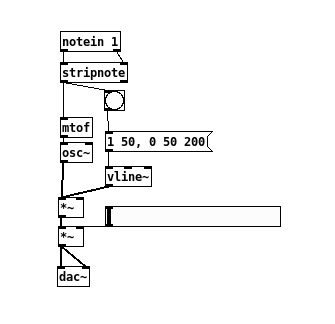
And indeed, it does work. It is able to iterate through all my columns, play some sounds, and I'm able to control it all through the device. Generating sound is (ultimately) not something I'm ready for yet on my own with Rust, but one day, perhaps.
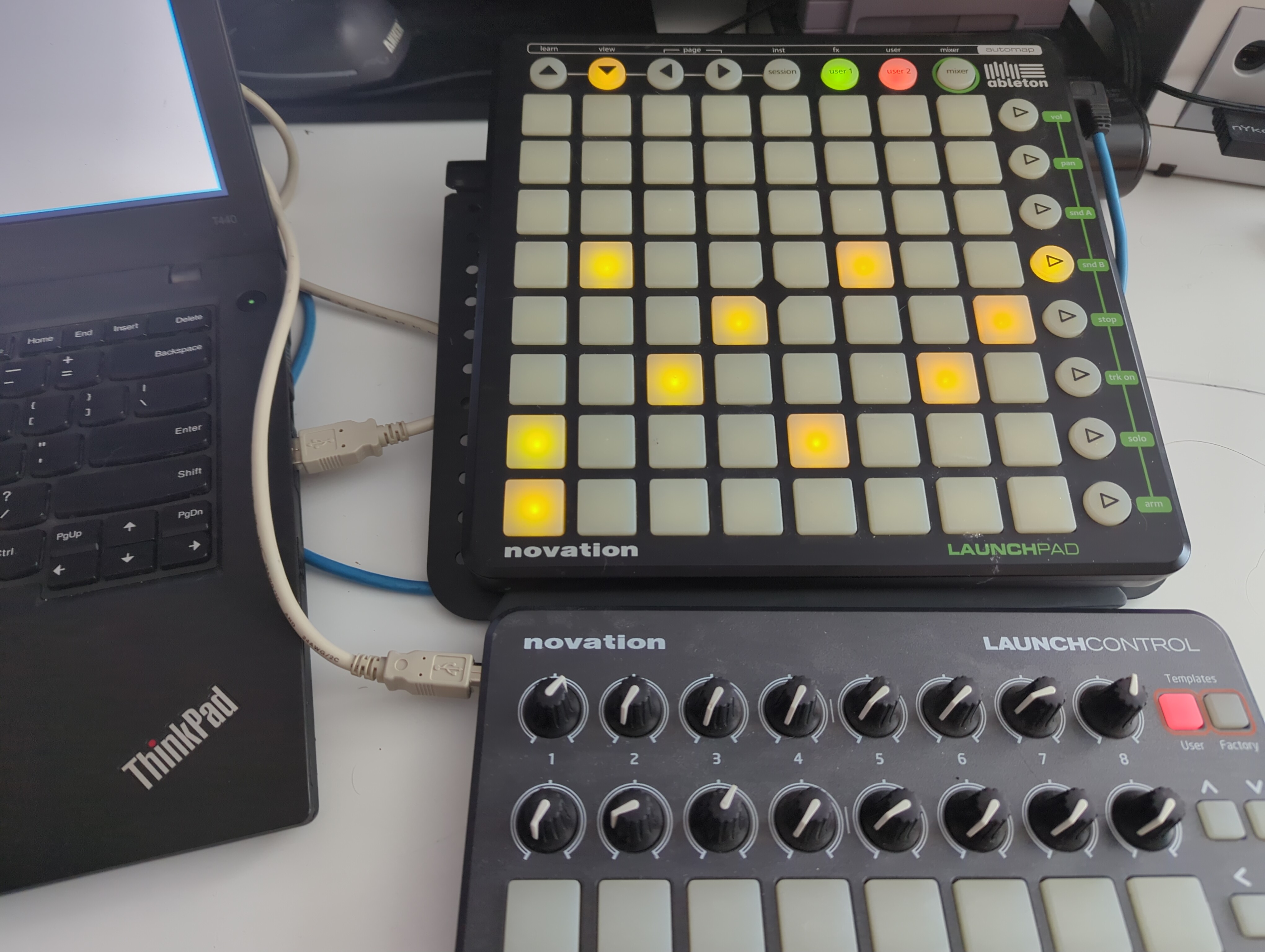
One thing you can do is hook multiple MIDI devices together and use them in conjunction with one another. Here I am using the Launchpad with my laptop and also a Novation Control grid. The only limitation is how much power your USB buses can deliver to each device at this point, before having to rely on external USB power blocks.
Conclusions
I think I had more fun doing this than most projects I've done in the past. It's been long enough since I started that I am frankly glad that I can put this one to bed, finally. There's a lot of work to be done with it, still, to make it a little sturdier. Maybe one day I'll add some additional scheduling tasks to break things up into widgets instead and re-write the shared state aspect of it. But for a 45+ day long project, I think I'm satisfied.
Overall, things I learned:
- Scheduling and timing with precision
- Maintaining program state across multiple functions without fear
- Better understanding of what works in Rust and what doesn't
- A little more audio knowledge insight in Linux
- Designs I should try next program
Things I should probably do soon:
- Re-think how octave is calculated. Not all octaves are useful.
- Save compositions to file and be able to load comps from file
- Program arguments so device ports aren't hard-coded
- Try porting it to a different hardware device
The code is online for anyone who wants to view it in full detail with more comments. I may create more projects in that repo in the near future depending on my creativity. I'm a little exhausted from both this and the other events that happened, so I'm ready for a new project.
Thanks for reading. I think I'll come back in May with something new.